Wincor Nixdorf
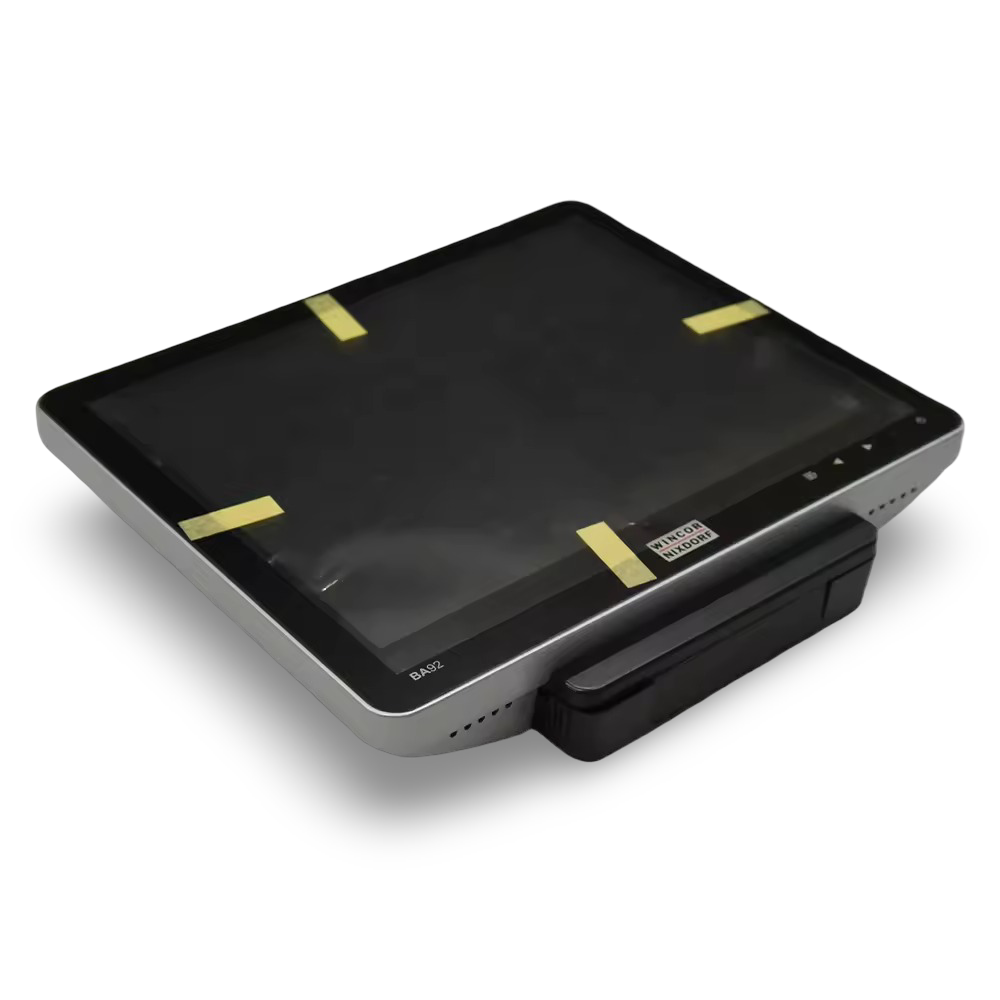
Diebold Nixdorf BA92 Touchscreen — 6 months Warranty Pn 1750298110
Diebold Nixdorf BA92 Touchscreen — 6 months Warranty Pn 1750298110
Couldn't load pickup availability
New Open Box
Diebold Nixdorf BA92 Touchscreen — 6 months Warranty
12.1" Projected Capacitive POS Touchscreen — SilverCommercial-grade 10-point multitouch display built for retail, hospitality, and POS environments.
|
 |
Important — this is the monitor unit only
This listing is for the BA92 touchscreen monitor only. It does not include a stand, power supply, or interface cables. These are standard Diebold Nixdorf accessories and are widely available. See the "You'll Also Need" section below for the specific parts required.
Condition: This monitor is brand new and unused. It has been removed from its original packaging and reboxed by Printer Genie in a plain carton for safe transit.
Who Is This Touchscreen For?
| Replacing a failed or damaged POS displayIf your existing BA92 or BA9x-series touchscreen has failed, this is a like-for-like replacement — same mounting, same interfaces, same software compatibility. | Expanding a Diebold Nixdorf POS setupAdding a second operator screen or customer-facing display to an existing Diebold Nixdorf BEETLE or iPOS system. The BA92 mounts as a rear second display on the BA93 or BA93W. |
| Retail checkout and EPOSBuilt for till-side use in shops, pharmacies, and retail environments. The projected capacitive touchscreen responds to gloved fingers and can be cleaned without false inputs. | Hospitality and quick-serviceCompact enough for tight counter spaces in cafes, bars, and restaurants. The anti-glare screen stays readable under bright lighting. VESA mount keeps the counter clear. |
| Kiosk and self-service touchpointsThe 10-point multitouch, bezel-free glass, and VESA mounting make this a strong fit for interactive kiosk builds, information points, and customer-facing self-service stations. | Not sure if this is the right screen?Check the interface section below — the BA92 connects via PanelLink2, DVI, or VGA. If you need a larger screen, the BA93 (15") and BA93W (15.6" widescreen) use the same mounting and interfaces. |
Specifications
| Screen size | 12.1" (30.7 cm) — 4:3 aspect ratio |
| Resolution | 800 x 600 (SVGA) |
| Touch technology | Projected capacitive (PCAP) — 10-point multitouch |
| Brightness | 400 cd/m² |
| Contrast ratio | 800:1 |
| Viewing angle | 80° / 80° (horizontal), 60° / 80° (vertical) |
| Colours | 16.7 million |
| Panel type | TFT with LED backlight — anti-glare surface |
| Video interfaces | PanelLink2, DVI-D, VGA |
| Data and peripherals | USB-A (hub), USB-B (upstream), 12V DC power jack |
| Audio | Integrated 2W speakers (USB audio) |
| Sensors | Ambient light sensor (ALS), presence sensor — both reduce power consumption automatically |
| Mounting | VESA 100 — compatible with desktop stands, pole mounts, wall mounts, and dual-display adapters |
| Dimensions (without stand) | 292 x 257.9 x 47 mm |
| Weight | 2.0 kg (monitor only) — 4.5 kg with stand |
| Power consumption | 9.9W typical, under 0.5W standby — EnergyStar compliant |
| Operating temperature | 5°C to 40°C |
| Colour | Silver |
| Part number | 1750298110 |
| Condition | New Open Box — brand new, unused, reboxed by Printer Genie in plain carton |
What's Included
| Included | Not included — order separately |
|
✓ 1 × Diebold Nixdorf BA92 touchscreen monitor (1750298110) ✓ 6-month Printer Genie warranty |
✗ Power supply — 12V DC adapter required ✗ Stand — desktop, pole, or VESA mount ✗ Video cable — DVI, VGA, or PanelLink2 ✗ USB cable — USB A-B for touch data and USB hub |
You'll Also Need
To get this monitor up and running you'll need the following. All are standard Diebold Nixdorf accessories — contact us if you need help sourcing any of them.
| Power supply (12V DC)The BA92 is powered via a 12V DC jack or via a PanelLink2 cable (which carries power and data in one cable). If not using PanelLink2, you'll need a 12V DC adapter and the Diebold Nixdorf Y-cable (1750249767). | Video cableConnect via DVI-D, VGA, or PanelLink2 depending on your POS system. PanelLink2 is a single-cable solution carrying video, touch data, USB, and power. |
| USB cable (A-B)Required for touch input and the integrated USB hub when using DVI or VGA as your video connection. Not needed if using PanelLink2. | Stand or mountThe monitor has a VESA 100 mount on the rear. Diebold Nixdorf offer a desktop stand, pole mount, and dual-display adapter. Any standard VESA 100 mount will also work. |
Warranty
6-month Printer Genie warranty included. This new open box touchscreen is covered against manufacturing defects for 6 months from date of purchase.
The warranty does not cover accidental damage, incorrect installation, misuse, electrical damage, physical damage, or damage caused by use with an incompatible power supply.
Full warranty terms are available in our Terms of Service. GenieCare™ Expert Support is separate from the product warranty and covers remote guidance, diagnosis, and advice
Condition Notes
This monitor is brand new and unused. It has been removed from its original Diebold Nixdorf packaging and reboxed by Printer Genie in a plain brown carton for safe transit. All functions — including touchscreen, all video inputs, USB hub, and sensors — have been verified working before despatch.
FAQ
Does this include a power supply or cables?
No — this listing is for the monitor unit only. You will need a power supply (12V DC adapter or PanelLink2 cable), a video cable (DVI, VGA, or PanelLink2), and a USB A-B cable for touch input. If using PanelLink2, one cable handles everything. Contact us if you need help identifying the right accessories for your setup.
Will this work with my existing POS system?
The BA92 connects via standard DVI-D or VGA video, with touch input over USB. It will work with any POS system or PC that has a DVI or VGA output and a USB port. For Diebold Nixdorf BEETLE or iPOS systems, you can also use the proprietary PanelLink2 single-cable connection. Touch input works natively on Windows, with driver support for Linux.
Can I use a standard VESA mount?
Yes — the BA92 has a standard VESA 100 mounting pattern on the rear. Any VESA 100 compatible arm, stand, pole mount, or wall bracket will work. Diebold Nixdorf also make their own desktop stand and pole mount specifically for this screen.
Can I mount a second display on the back?
Yes — the BA92 can also be mounted as a rear second display on the BA93 or BA93W using a dual-display adapter. The BA92 itself can carry a smaller rear display (BA90 8" or BA91W 10.1") with the same adapter.
Why is this in a plain box instead of original packaging?
This monitor is brand new and unused but has been reboxed by Printer Genie in a plain brown carton. The original Diebold Nixdorf packaging is no longer available. All functions have been verified working before despatch.
Is this a full EPOS terminal?
No — this is a touchscreen monitor only, not a complete EPOS terminal. It does not contain a computer, processor, or storage. It connects to your existing POS system or PC as a display and touch input device.