Printer Genie
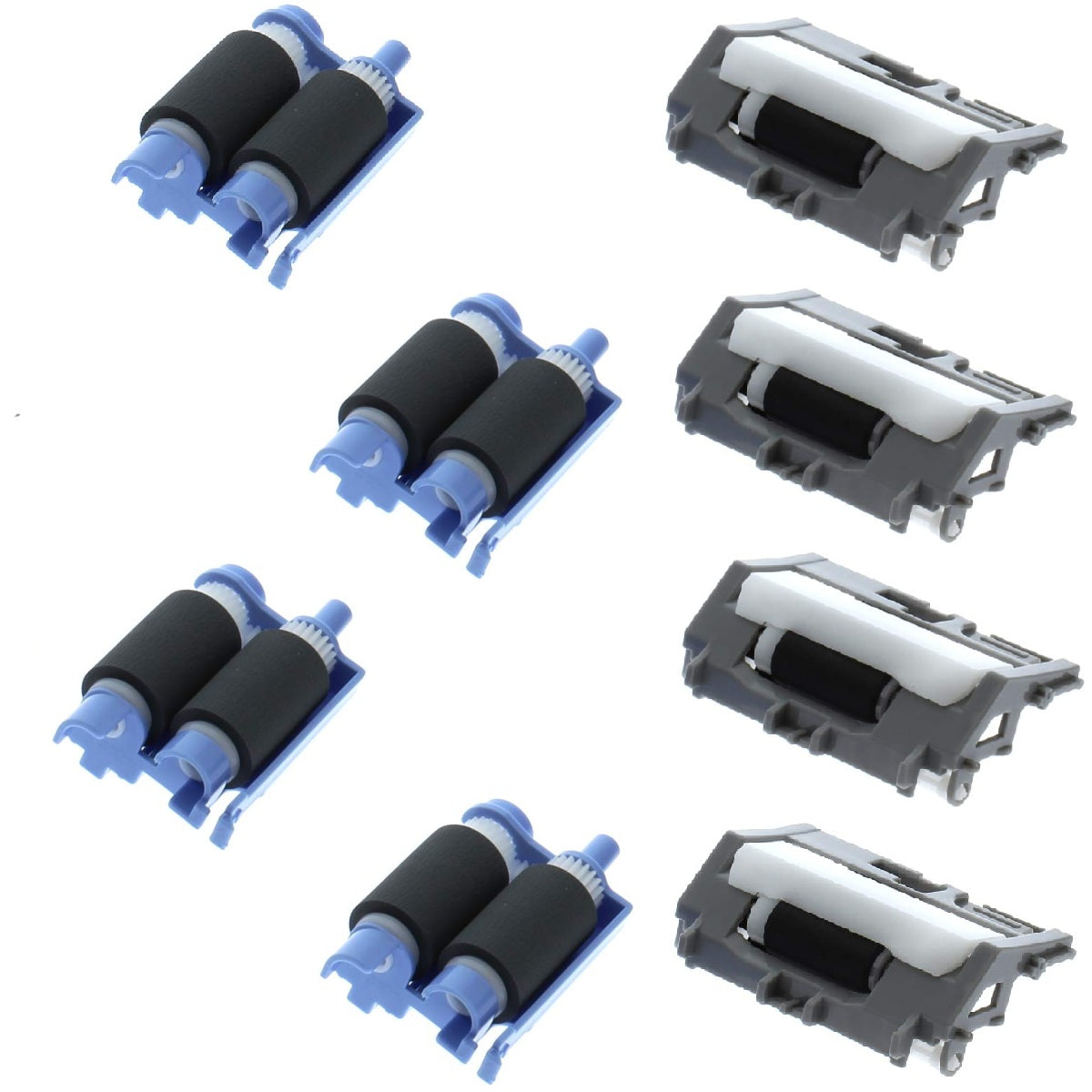
HP M506 M527 Tray Roller Kit F2A68-67913 — 8 Rollers, Covers 4 Trays
HP M506 M527 Tray Roller Kit F2A68-67913 — 8 Rollers, Covers 4 Trays
Couldn't load pickup availability
HP LaserJet M506 M527 & Managed E50045–E52645 Tray Roller Kit F2A68-67913 — Set of 4 (8 Rollers, Covers 4 Trays)
Paper misfeeding or jamming from the cassette trays?
Restore reliable feeding with a complete set of pickup and separation rollers — enough to refresh all four cassette trays.
- Set of 4 — 4 pickup rollers and 4 separation rollers (8 rollers), enough for four trays
- Fits Tray 2 and the optional 550-sheet feeders on HP M506, M527 and Managed E-series
- OEM references: F2A68-67913 / RM2-5752-000CN (kit) — RM2-5741 pickup, RM2-5745 separation
- New compatible rollers, produced to OEM specification for feed torque and surface quality
- 90-day warranty against manufacturing defects
- UK supplier — despatched from our warehouse
Is This the Right Part?
| Paper not feeding from a cassette trayThe printer sounds like it is trying to pick up paper but the page fails to enter the feed path, or a jam is reported immediately. A worn pickup roller has lost the grip needed to pull paper from the stack. | Multiple sheets feeding at onceTwo or more sheets pull through together, causing jams or double-printed pages. The separation roller is designed to hold back the second sheet — when worn, it no longer can. |
| Recurring jams at tray entryJams happening repeatedly at the same point as paper leaves the tray are almost always worn rollers. Fitting a fresh pickup and separation roller together typically resolves this permanently. | Paper slipping or skewing on entryIf paper enters at an angle or slips before reaching the registration rollers, worn roller surfaces are usually the cause. New rollers restore correct feed torque and alignment. |
| How much does this kit cover?This is a set of 4 — four pickup rollers and four separation rollers (8 rollers in total). Each tray takes one pickup and one separation roller, so the kit refreshes up to four cassette trays: Tray 2 plus the three optional 550-sheet feeders. | Not sure which tray is at fault?This kit is for the 550-sheet cassette trays (Tray 2 and optional feeders), not the multipurpose Tray 1. If you're unsure which tray the fault is from, contact us and we'll help confirm. |
Specifications
| Component | Pickup & separation roller kit for the 550-sheet cassette trays |
| Primary OEM part number | F2A68-67913 |
| Alternative part numbers | RM2-5752-000CN (kit) · RM2-5741 (pickup roller) · RM2-5745 (separation roller) |
| Condition | New compatible — produced to OEM specification |
| Target location | Tray 2 and the optional 550-sheet feeders (Trays 3–5) — not the multipurpose Tray 1 |
| Quantity supplied | 8 rollers — 4 × pickup (RM2-5741) and 4 × separation (RM2-5745), enough for 4 trays |
| Warranty | 90 days against manufacturing defects — normal wear not covered |
| Weight & delivery | Courier delivery, tracked |
Compatible Printers
This kit fits the 550-sheet cassette trays (Tray 2 and the optional feeders) on the following HP models. The multipurpose Tray 1 uses a different roller. Contact us before ordering if your model isn't listed or you're unsure which tray the fault is from.
| Range | Models |
| LaserJet Enterprise M506 | M506n, M506dn, M506x, M506dnm, M506xm |
| LaserJet Enterprise MFP M527 | M527dn, M527f, M527c, M527z, M527cm, M527dnm |
| LaserJet Managed E50045 / E50145 | E50045dw, E50145dn (also DEX D50145dn) |
| LaserJet Managed MFP E52545 | E52545dn, E52545c |
| LaserJet Managed MFP E52645 | E52645dn, E52645c (also DEX D52645dn) |
What's Included
- 4 × pickup roller (RM2-5741) for the 550-sheet cassette trays
- 4 × separation roller (RM2-5745) for the 550-sheet cassette trays
- Enough to refresh up to four paper trays — one pickup and one separation roller per tray
Install Notes
- Power off and unplug the printer.
- Pull out the paper cassette (Tray 2 or the optional feeder) and set it aside.
- Locate the pickup roller and the separation roller inside the tray cavity and on the feeder. Release each roller from its shaft, noting the orientation before removing.
- Fit the new rollers the same way round, and clean adjacent feed surfaces with a lint-free cloth and isopropyl alcohol if contaminated.
- Refit the cassette, power on, and run 5–20 test prints to confirm stable feeding. Repeat for each tray you are refreshing.
Frequently Asked Questions
How many trays does this kit cover?
It's a set of 4 — four pickup rollers and four separation rollers, eight rollers in total. Each tray takes one pickup and one separation roller, so the kit refreshes up to four cassette trays: Tray 2 and the three optional 550-sheet feeders.
Which trays does it fit — does it do Tray 1?
It fits the 550-sheet cassette trays — Tray 2 and any optional 550-sheet feeders (Trays 3–5). It does not fit the multipurpose Tray 1, which uses a different roller.
Should I replace the pickup roller or the separation roller?
Both. A worn pickup roller means paper isn't picked up or feeds inconsistently; a worn separation roller means two sheets feed at once. They wear at a similar rate, so fitting both together per tray gives a lasting fix — which is why this kit supplies a pair for each of two trays.
The fault is still happening after fitting — what next?
Paper feed faults can also come from a solenoid, clutch, or sensor, which new rollers won't resolve. Check you've fitted the correct tray's rollers, then contact us and we'll help diagnose the next step.
Share