Printer Genie
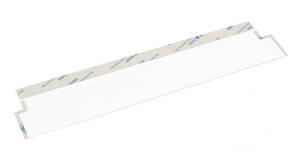
HP ADF Mylar Film Strip B3Q10-00060 — LaserJet M277 Series and Others
HP ADF Mylar Film Strip B3Q10-00060 — LaserJet M277 Series and Others
Regular price
£10.00 GBP
Regular price
Sale price
£10.00 GBP
Unit price
per
Shipping calculated at checkout.
Condition: New
Couldn't load pickup availability
New
HP Document Feeder Mylar Film Strip — Part Number B3Q10-00060
Compatible replacement for HP B3Q10-00060 — in stock, UK supplierCompatible document feeder mylar film strip for HP LaserJet Pro MFP printers using part number B3Q10-00060. Pre-cut, peel and apply.
|
 |
Specifications
| Component | Document Feeder Mylar Film Strip (ADF Mylar Ramp Film) |
| OEM part reference | B3Q10-00060 |
| Brand | Printer Genie |
| Condition | New — compatible replacement, produced to OEM specification |
| Target location | Document feeder — scanning path ramp |
| Quantity supplied | 1 × Document Feeder Mylar Film Strip |
| Primary compatible series | HP Colour LaserJet Pro MFP M277 series — also fits other models, see individual model listings |
| Warranty | 90 days against manufacturing defects — normal wear from use is not covered |
| Weight & delivery | Approx. 10g — standard letter post |
Compatible Printers
This part fits the document feeder on HP Colour LaserJet Pro MFP M277 series printers and also fits a number of other HP LaserJet Pro MFP models. If you have searched for B3Q10-00060 you will already know your printer's fitment. For model-specific listings with full compatible model tables, search our store by your printer model number.
What's Included
- 1 × Document Feeder Mylar Film Strip — compatible replacement for HP B3Q10-00060
- Pre-cut and ready to fit — no trimming required
Install Notes
- Power off and unplug the printer.
- Open the document feeder cover and locate the existing mylar film on the scanning ramp.
- Peel away the old film carefully. Clean the surface with a lint-free cloth to remove any adhesive residue.
- Peel the backing from the new film and apply firmly to the ramp, aligning to the original position.
- Close the document feeder and run several test scans to confirm the fault is resolved.
Note: ADF feed faults can have more than one cause. If faults persist after fitting, further diagnosis of the ADF roller or separator pad may be needed.