Printer Genie
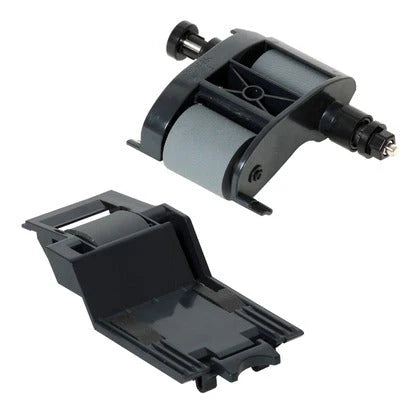
HP L2725-60002 L2718A ADF Maintenance Kit M525 M575 M680 M725 X585 New OEM
HP L2725-60002 L2718A ADF Maintenance Kit M525 M575 M680 M725 X585 New OEM
Regular price
£45.00 GBP
Regular price
Sale price
£45.00 GBP
Unit price
per
Shipping calculated at checkout.
Condition: New
Couldn't load pickup availability
New — Original HP
HP ADF Maintenance Kit L2725-60002 — Document Feeder Roller Kit for HP LaserJet Enterprise
Genuine HP ADF Maintenance Kit — Fix Document Feeder Faults at SourceOriginal HP part. Direct replacement for worn document feeder rollers on HP LaserJet Enterprise M525, M575, M630, M680, M725, OfficeJet X585, and ScanJet 7500 / 8500 series.
|
 |
Specifications
| Component | ADF Maintenance Kit — document feeder pickup roller and separation pad assembly |
| Primary OEM part number | L2725-60002 |
| Alternative part number | L2718A |
| Condition | New — Original HP (genuine OEM) |
| Target location | Document feeder (ADF) — replaces the document feeder pickup roller and separator pad |
| Quantity supplied | 1 × ADF Maintenance Kit (roller and pad assembly) |
| Compatible series | HP LaserJet Enterprise M525, M575, M630, M680, M725 — HP OfficeJet Enterprise X585 — HP ScanJet Enterprise 7500 / 8500 fn1 |
| Warranty | 12 months against manufacturing defects — normal wear from use is not covered |
| Weight & delivery | [WEIGHT] — UK stock, despatched within 1 working day |
Compatible Printers
This kit fits the document feeder (ADF) on the following HP models. It does not cover paper tray feed rollers — those use different part numbers.
| Model | Location |
| HP LaserJet Enterprise 500 MFP M525dn / M525f / Flow MFP M525C | Document feeder (ADF) |
| HP Colour LaserJet Enterprise MFP M575c / M575dn / M575f | Document feeder (ADF) |
| HP LaserJet Enterprise Flow MFP M630z / MFP M630f / MFP M630h | Document feeder (ADF) |
| HP Colour LaserJet Enterprise MFP M680dn / M680f / Flow MFP M680z | Document feeder (ADF) |
| HP LaserJet Enterprise MFP M725dn / M725f / M725z / M725z Plus | Document feeder (ADF) |
| HP OfficeJet Enterprise Colour MFP X585dn / X585f / Flow MFP X585z | Document feeder (ADF) |
| HP ScanJet Enterprise 7500 / 8500 fn1 | Document feeder (ADF) |
What's Included
- 1 × HP ADF Maintenance Kit — document feeder pickup roller and separator pad assembly (L2725-60002 / L2718A)
- No tools required beyond a standard Phillips screwdriver
- Note: this kit covers the document feeder only — paper tray rollers are separate parts
Install Notes
- Power off and unplug the printer.
- Open the document feeder cover — lift the ADF lid fully to access the roller assembly.
- Release the pickup roller by sliding or unclipping it from its shaft — refer to your printer's service manual for the exact release method on your model.
- Remove the separation pad assembly from its slot.
- Fit the new roller and pad — ensure both are seated securely and the roller clicks into position.
- Clean adjacent feeder surfaces with a lint-free cloth. Isopropyl alcohol can be used on glazed rubber surfaces.
- Close the ADF cover and run 5–10 test scan or copy jobs to confirm stable document feeding.
Document feeder faults can have more than one cause. Replacing the roller kit resolves the most common wear-related feed faults. If problems persist after fitting, sensor or mechanical faults may also be present.