1
/
of
1
Printer Genie
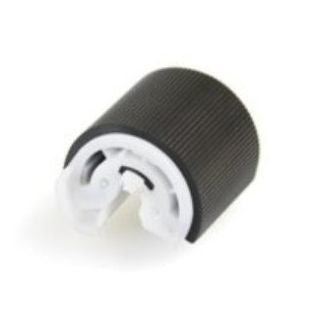
HP LaserJet 2100 2200 Tray 1 Pickup Roller RB2-2900
HP LaserJet 2100 2200 Tray 1 Pickup Roller RB2-2900
Regular price
£3.00 GBP
Regular price
Sale price
£3.00 GBP
Unit price
/
per
Shipping calculated at checkout.
Condition: New
Couldn't load pickup availability
RB2-2900 – HP LaserJet 2100 2200 Series – Tray 1 Pickup Roller – Restores Reliable Paper Feeding
Condition – New
All parts are produced to OEM specification for feed torque and surface quality. We only stock top-grade components that maintain original print performance and page-handling reliability.
Highlights
- Direct-fit replacement for Tray 1 on HP LaserJet 2100 and 2200 series printers
- Part type: Pickup Roller
- OEM references: RB2-2900 (primary); Aliases: RB2-2900-000, RB2-2900-000CN
- 90-day warranty against manufacturing defects (normal wear from use is not covered)
Specifications
| Component | Pickup Roller |
|---|---|
| OEM References | RB2-2900; Aliases: RB2-2900-000; RB2-2900-000CN |
| Alternate Part Numbers | RB2-2900-000, RB2-2900-000CN |
| Target Location | Tray 1 (Multipurpose Tray) |
| Compatible Printers (summary) | HP LaserJet 2100 Series; HP LaserJet 2200 Series — this page is for printers using RB2-2900 pickup rollers |
What’s Included
- 1 × Pickup Roller for Tray 1 on HP LaserJet 2100 and 2200 Series
Compatibility
View Compatible Models
This listing is for:
- HP LaserJet 2100
- HP LaserJet 2100m
- HP LaserJet 2100se
- HP LaserJet 2100tn
- HP LaserJet 2100xi
- HP LaserJet 2200
- HP LaserJet 2200d
- HP LaserJet 2200dn
- HP LaserJet 2200dse
- HP LaserJet 2200dt
- HP LaserJet 2200dtn
- HP LaserJet 2200m
- HP LaserJet 2200s
- HP LaserJet 2200se
- HP LaserJet 2200tn
- HP LaserJet 2200xi
We verify model coverage before publishing. If your exact model has variations, please contact us before purchase.
Install Notes (Quick)
- Power off and unplug the printer.
- Access Tray 1 (Multipurpose Tray), release the old pickup roller, and install the new part.
- Ensure correct orientation and that the part is fully seated.
- Clean adjacent feed surfaces if contaminated (use isopropyl wipes and lint-free cloth).
- Reassemble and run 5–20 test prints to confirm smooth feeding.
Recommended Companion Parts
- RF5-3272 Tray 1 Separation Pad Assembly
- Tray 2 Pickup Roller for HP LaserJet 2200 Series
- Lint-free wipes and isopropyl cleaning pack – recommended for cleaning adjacent feed rollers and pad surfaces during installation.
Share