Printer Genie
HP C9153A Maintenance Kit — LaserJet 9000/9040/9050 Series Refurbished
HP C9153A Maintenance Kit — LaserJet 9000/9040/9050 Series Refurbished
Couldn't load pickup availability
Refurbished
HP C9153A Maintenance Kit — LaserJet 9000/9040/9050 Series Refurbished
Complete Service Kit for HP LaserJet 9000, 9040 & 9050 Series PrintersRefurbished HP C9153A maintenance kit — professionally refurbished by Printer Genie, 220V UK spec.
|
 |
When Should You Fit a Maintenance Kit?
| Your printer is showing a maintenance kit warningMessages such as "Perform Printer Maintenance" or "Replace Maintenance Kit" indicate the printer has tracked sufficient page counts to recommend a full service. This is the manufacturer's prompt to replace the key wear parts before faults develop. | You're approaching 350,000 pagesThe maintenance kit is designed to be replaced at approximately 350,000 pages. Fitting it at or before this point is the best way to maintain print quality and avoid unplanned downtime on a business-critical printer. |
| Recurring paper jams or feed issuesIf your printer is regularly jamming, mis-feeding, or picking multiple sheets at once, the pickup rollers and separation pads are likely worn. These are included in the maintenance kit and replacing them resolves the majority of chronic feed problems. | Print quality has declinedIf you're seeing toner smudging, ghosting, or uneven print quality and a new toner hasn't resolved it, the fuser — included in most maintenance kits — is often the cause. A full maintenance kit service is the most thorough approach. |
| Planned servicing of a refurbished or second-hand printerIf you've purchased a used or refurbished printer and are unsure of its service history, fitting a maintenance kit is the most reliable way to start with fresh wear parts and a known service baseline. | Not sure if a kit is what you need?If you're experiencing a specific fault and aren't sure whether a full maintenance kit or an individual part is the right solution, contact us. Our team can help you make the right call — and we sell the individual parts too if that's a better fit. |
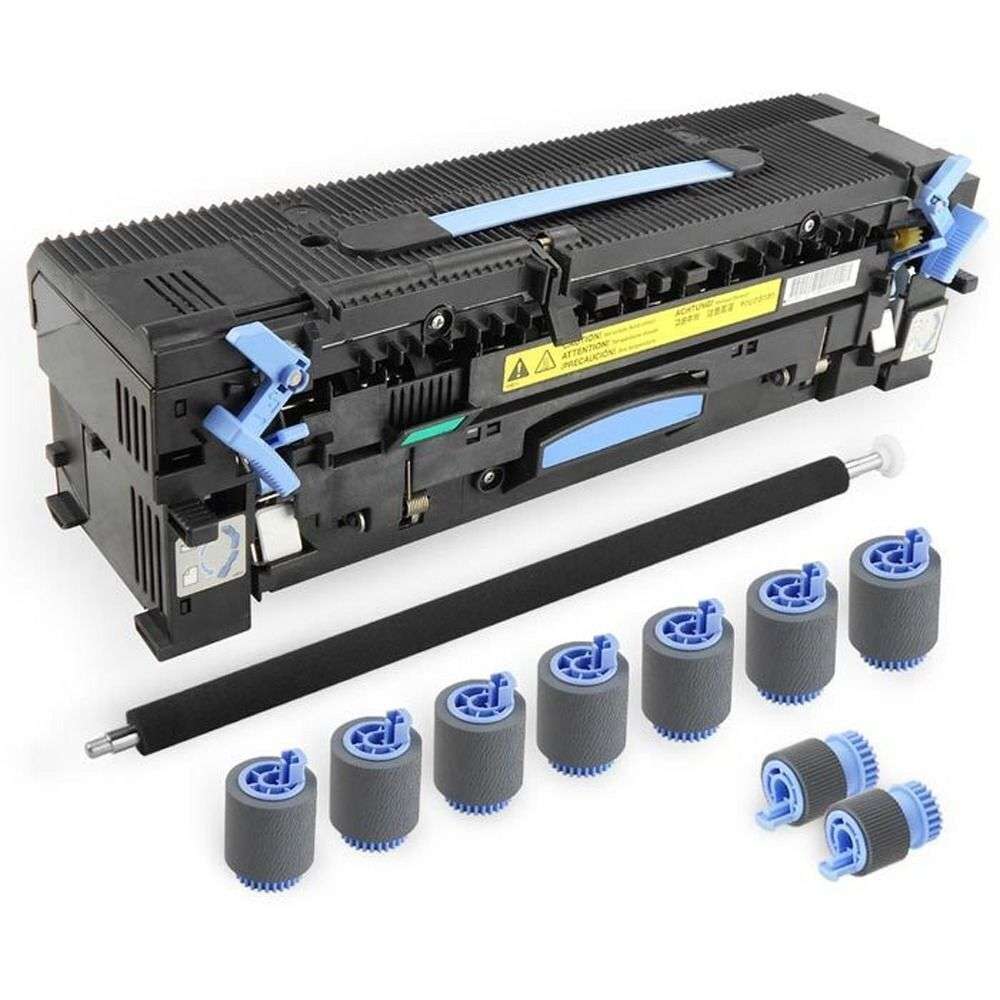
What's in This Maintenance Kit
| Component | Part Number | Purpose |
| Fuser assembly (220V) — x1 | RG5-5751 | Bonds toner to paper using heat — resolves smudging, ghosting, and fuser errors |
| Pickup roller (Tray 2 & 3) — x2 | RF5-3340 | Feeds paper from tray into the printer — resolves mis-feed and paper jam issues |
| Feed / separation roller (Tray 2 & 3) — x7 | RF5-3338 | Prevents multiple sheets feeding at once — resolves multi-feed jams |
| Transfer roller assembly — x1 | Included | Transfers toner from drum to paper — resolves light print and uneven coverage |
Specifications
| Kit type | 220V Preventative Maintenance Kit — full service kit for scheduled maintenance at 350,000 page intervals |
| Primary OEM part number | C9153A |
| Alternative part numbers | C9153-67901 |
| Voltage | 220V — UK mains voltage is 230–240V. Ensure you select the correct voltage for your installation. |
| Condition | Refurbished |
| Rated life | 350,000 pages |
| Compatible printers | HP LaserJet 9000/9000N/9000DN/9000HN/9000MFP/9000LMFP/9000HNF, 9040/9040N/9040DN/9040MFP, 9050/9050N/9050DN/9050MFP, M9040, M9050, M9059 (220V) |
| Maintenance counter reset required | Yes — reset via the printer service/maintenance menu after fitting |
| Weight & delivery | Courier delivery, tracked |
Compatible Printers
This maintenance kit fits the following HP models. If your model is not listed, contact us before ordering — different models in the same series may use different kits.
| Model | Part Number Confirmed | Notes |
| HP LaserJet 9000, 9000N, 9000DN, 9000HN | C9153A | 220V only — confirm your printer is UK/220V spec before ordering |
| HP LaserJet 9000MFP, 9000LMFP, 9000HNF | C9153A | 220V only |
| HP LaserJet 9040, 9040N, 9040DN, 9040MFP | C9153A | 220V only |
| HP LaserJet 9050, 9050N, 9050DN, 9050MFP | C9153A | 220V only |
| HP LaserJet M9040, M9050, M9059 | C9153A | 220V only |
What's Included
- 1 × HP LaserJet 9000/9040/9050 Series maintenance kit (C9153A) — full kit contents as listed above
- 30 days GenieCare™ Expert Support — installation guidance included from date of purchase
- GenieCare™ Expert Support continues when you order toner from us
Installation Notes
A full maintenance kit service involves replacing multiple components. We recommend working through each part in order. Allow adequate time — a full service typically takes 30–60 minutes on an A4 mono laser printer and longer on MFP or A3 machines.
- Power off the printer and disconnect from the mains. Allow the fuser to cool fully (at least 30 minutes) before handling.
- Replace the fuser unit — rear access panel, release locking levers, slide out old unit, fit new unit.
- Replace the pickup roller and separation pad — usually accessed via the paper tray or a dedicated access panel.
- Replace the transfer roller — typically located beneath the paper path, refer to the printer service menu for exact access.
- Reinstall any trays or covers removed during the service.
- Reconnect power, power on, and reset the maintenance counter via the service menu.
- Run a test print to confirm all parts are functioning correctly.
If you need help at any step, contact us via the GenieCare™ Expert Support channel — full installation guidance is included with this purchase.
Warranty & Support
6-month Printer Genie warranty — covers refurbishment defects and component failure under normal use. Does not cover accidental damage, incorrect installation, misuse, electrical or physical damage, contamination, use in an unsuitable printer, or wear beyond expected service life. Full terms in our Terms of Service.
30 days GenieCare™ Expert Support included free — guidance through every component of the service, maintenance counter reset help, and diagnosis if issues persist. Order HP 09A (C3909A) toner from Printer Genie after fitting and support continues automatically — no subscription, no sign-up.
GenieCare™ Expert Support is separate from and in addition to the warranty — it covers remote diagnosis and advice, not on-site repair.
GenieCare™ Expert Support – Included with This Kit

Frequently Asked Questions
-->