Printer Genie
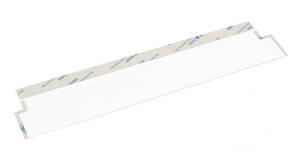
HP LaserJet M283 Document Feeder Mylar Film Strip
HP LaserJet M283 Document Feeder Mylar Film Strip
Couldn't load pickup availability
New
Fixing the repeating line on M283 feeder copies and scans.Replacement document feeder film strip for the HP Colour LaserJet Pro MFP M283 series. Puts an end to the line and smearing that come through on feeder jobs when the film is worn or peeling.
|
 |
How to tell it’s the feeder film
An M283 with a tired strip throws a coloured or dark line down each page sent through the feeder. Scan the same original from the glass and it's gone — that's the quickest check that the feeder film, not the scan bar, is at fault.
Quick check before you buy: copy or scan the same page twice — once through the document feeder, once from the flatbed glass. A line on the feeder copy but a clean glass copy means the feeder film is the fault, and this strip is the fix.
Specifications
| Component | Document Feeder Mylar Film Strip (ADF Mylar Ramp Film) |
| Brand | Printer Genie |
| Condition | New — compatible replacement, produced to OEM specification |
| Target location | Document feeder — scanning path ramp |
| Quantity supplied | 1 × Document Feeder Mylar Film Strip |
| Compatible models | HP Colour LaserJet Pro MFP M283fdw, M283fdn |
| Warranty | 90 days against manufacturing defects — normal wear from use is not covered |
| Weight & delivery | Approx. 10g — standard letter post |
Compatible Printers
This document feeder film strip fits the following HP LaserJet M283 series models:
| Model | Location |
| HP Colour LaserJet Pro MFP M283fdw | Document feeder |
| HP Colour LaserJet Pro MFP M283fdn | Document feeder |
What's Included
- 1 × Document Feeder Mylar Film Strip for HP Colour LaserJet Pro MFP M283 series
- Pre-cut and ready to fit — no trimming required
Install Notes
- Power off and unplug the printer.
- Open the document feeder cover and locate the existing film strip on the scanning ramp.
- Peel away the old film carefully. Clean the surface with a lint-free cloth to remove any adhesive residue.
- Peel the backing from the new film strip and apply firmly to the ramp, aligning to the original position.
- Close the document feeder and run several test scans to confirm the black lines have gone.
Note: clean the slim glass strip next to the feeder at the same time; a mark on it mimics a worn film exactly.