1
/
of
1
Printer Genie
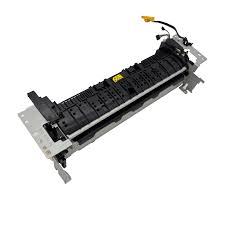
HP LaserJet M402, M404, M426, M428, M429, M430 Fuser Unit – RM2-5425 / RM2-2555
HP LaserJet M402, M404, M426, M428, M429, M430 Fuser Unit – RM2-5425 / RM2-2555
Regular price
£75.00 GBP
Regular price
Sale price
£75.00 GBP
Unit price
/
per
Shipping calculated at checkout.
Condition: Refurbished
Couldn't load pickup availability
Condition: Refurbished
Restore correct heat and pressure performance with this refurbished fuser unit. Designed to resolve common fuser-related print faults including smudging, ghosting, poor toner adhesion, and fuser end-of-life warnings.
This refurbished fuser unit has been professionally cleaned, tested, and verified for correct operating temperature and pressure. Wear components are inspected and replaced where required.
Highlights
- Direct-fit fuser unit for HP LaserJet M402, M404, M426, M428, M429 and M430 series
- OEM Part Numbers: RM2-5425, RM2-2555
- Fully tested and inspected refurbished unit
- Printer Genie expert email installation support available
Specifications
| Component | Fuser Unit (complete assembly) |
|---|---|
| OEM References | RM2-5425; RM2-2555 |
| Condition | Refurbished |
| Fitment | Rear-mounted fuser assembly |
What’s Included
- 1 × HP LaserJet Fuser Unit (RM2-5425 / RM2-2555)
Compatibility
View Compatible Models
- HP LaserJet M402 Series
- HP LaserJet M404 Series
- HP LaserJet M426 Series
- HP LaserJet M428 Series
- HP LaserJet M429 Series
- HP LaserJet M430 Series
Install Notes (Quick)
- Power off and unplug the printer; allow the fuser to cool fully.
- Remove the rear access panel and release the fuser locking levers.
- Install the replacement unit and reset the fuser counter if prompted.
HP fuser-related error messages and fault symptoms
- Replace Fuser Kit
- Fuser Life Warning
- 50.x Fuser Error (50.1, 50.2, 50.7)
- 50.7F – Fuser failure
- Printer reports fuser end of life
Print quality faults caused by a failing fuser (no error code)
- Toner smudging or rubbing off the page
- Ghosting or repeated images down the page
- Wrinkled or curled paper after printing
- Uneven gloss or patchy toner adhesion
- Toner flakes inside the printer
- Pages feel hot but toner is not bonded correctly
Common print problems customers report (no error code shown)
- Ink rubbing off the paper
- Print smears when touched
- Toner coming off on fingers
- Print looks wet or unfinished
- Text smudges after printing
- Pages sticking together when warm
- Paper coming out wrinkled or crinkled
- Paper curling after printing
- Repeated marks or shadows down the page
- The same image repeating lower on the page
- Printer printing but ink not sticking
- Paper feels hot but print wipes off
Disclaimer: Some error codes or print faults may have multiple causes. Replacing the fuser unit may not resolve all issues. Further diagnosis may be required.
Share