Printer Genie Ltd
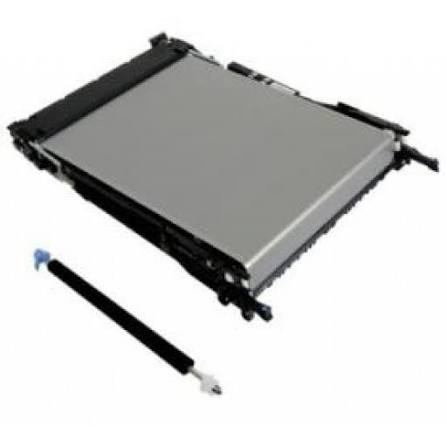
HP B5L24-67901 Belt & Roller Kit M552 M553 M577 — 90-Day Warranty & GenieCare™
HP B5L24-67901 Belt & Roller Kit M552 M553 M577 — 90-Day Warranty & GenieCare™
Couldn't load pickup availability
Refurbished
UK refurbishment specialist Rebuilt and warranted GenieCare™ support included
HP B5L24-67901 Belt & Roller Kit — 90-Day Warranty & GenieCare™ Expert Support
Restore correct colour transfer on your HP Colour LaserJet Enterprise M552, M553 or M577Complete refurbished transfer belt and secondary transfer roller kit — both parts, one order.
|
 |
Availability & Lead Time
Ready to Ship — held in stock and despatched from our warehouse. Refurb to Order — rebuilt specifically for your order. Choose your option above using the dropdown next to the price. Courier delivery, tracked. We don't refurbish this part until it's ordered unless we're holding ready stock, so every unit is properly stripped down and rebuilt rather than reconditioned in bulk ahead of time.
Is This the Right Transfer Belt Kit?
| Colour banding, lines, or streaks on colour printsHorizontal lines, banding, or streaks across colour pages — particularly when they repeat at regular intervals — often point to a worn or scratched transfer belt. This is one of the most reliable indicators that the belt needs replacing. | Transfer belt warning or end-of-life messageError messages such as 59.X Transfer Motor Error, 59.00, 59.10, 59.20, or a "replace transfer kit" message indicate the transfer belt has reached end of life or has failed. Replacing the kit and resetting the counter will clear these warnings. |
| Colour registration issues or misalignmentWhen colours appear misaligned or shifted — cyan, magenta, yellow, or black not lining up correctly — the transfer belt is a common cause, along with drum units. Running a colour registration calibration after fitting will confirm whether the belt has resolved the issue. | Dirty prints or ghosting after high page countsIf you're printing high volumes on one of these models and are seeing dirty colour prints, ghosting, or shadowing, the transfer belt and secondary transfer roller are worth replacing together — they wear as a pair, which is why HP supplies them as a single kit. |
| Toner contamination inside the printerA cracked or damaged transfer belt can release toner inside the printer, causing visible contamination on internal components or on the underside of pages. This usually means the belt needs replacing as soon as possible. | Not sure? Ask us firstColour print quality faults can have several causes — transfer belt, transfer roller, drum units, toner, or calibration. If you're not certain, contact us before ordering. We can help confirm the right part for your fault. |
Specifications
| Component | Intermediate transfer belt (ITB) assembly and secondary transfer roller — supplied together as one kit |
| Primary OEM part number | B5L24-67901 |
| Alternative part numbers | RM2-6576 / RM2-6576-000 / RM2-6576-000CN / RM2-1306 |
| Condition | Refurbished |
| Availability | Ready to Ship or Refurb to Order — select above near Add to Cart. Courier delivery, tracked. |
| Compatible printers | HP Colour LaserJet Enterprise M552 / M553 / M577 series (see full model list below) |
| Counter reset required | Yes — reset the transfer kit counter from the printer's service menu after fitting |
| Calibration after fitting | Required — run a colour registration calibration from the printer menu after fitting |
| Weight & delivery | Courier delivery, tracked |
Compatible Printers
This kit fits the following HP models. If your model is not listed, contact us before ordering — we may be able to confirm compatibility.
| Model | Part Number Confirmed |
| HP Colour LaserJet Enterprise M552dn | B5L24-67901 |
| HP Colour LaserJet Enterprise M553dn | B5L24-67901 |
| HP Colour LaserJet Enterprise M553n | B5L24-67901 |
| HP Colour LaserJet Enterprise M553x | B5L24-67901 |
| HP Colour LaserJet Enterprise Flow MFP M577c | B5L24-67901 |
| HP Colour LaserJet Enterprise MFP M577dn | B5L24-67901 |
| HP Colour LaserJet Enterprise MFP M577f | B5L24-67901 |
| HP Colour LaserJet Managed MFP M577cm | B5L24-67901 |
| HP Colour LaserJet Managed MFP M577dnm | B5L24-67901 |
| HP LaserJet Managed MFP E57540dn | B5L24-67901 |
| HP LaserJet Managed Flow MFP E57540z | B5L24-67901 |
| HP LaserJet Managed E55040dn | B5L24-67901 |
What's Included
- 1 × HP Colour LaserJet Enterprise M552 / M553 / M577 transfer belt (ITB) assembly
- 1 × Secondary transfer roller
- 30 days GenieCare™ Expert Support — installation guidance included from date of purchase
- GenieCare™ Expert Support continues when you order toner from us
Installation Notes
Handle the transfer belt with care. Do not touch the belt surface — even small amounts of skin oil or debris can cause print quality issues. Keep both parts in their packaging until you are ready to fit them.
- Power off the printer and disconnect from the mains.
- Open the front access panel and remove the toner cartridges to access the transfer belt assembly.
- Release the transfer belt assembly using its coloured release levers and lift it out, then remove the secondary transfer roller from its housing.
- Fit the new secondary transfer roller first, then insert the new transfer belt assembly — do not touch the belt surface.
- Insert the new transfer belt carefully — do not touch the belt surface.
- Reinstall toner cartridges and close all panels.
- Power on and run a colour registration calibration from the printer menu.
- Reset the transfer kit counter via the service menu.
Exact panel layout and release mechanism vary slightly by model — if you need help at any step, contact us via the GenieCare™ Expert Support channel, installation guidance is included with this purchase.
Warranty & Support
90-day Printer Genie warranty — covers refurbishment defects and component failure under normal use. Does not cover accidental damage, incorrect installation, misuse, electrical or physical damage, contamination, use in an unsuitable printer, or wear beyond expected service life. Full terms in our Terms of Service.
30 days GenieCare™ Expert Support included free — installation guidance, calibration help, counter reset instructions, and diagnosis if print quality issues persist after fitting. Order HP 508A/508X toner from Printer Genie after fitting and support continues automatically — no subscription, no sign-up.
GenieCare™ Expert Support is separate from and in addition to the warranty — it covers remote diagnosis and advice, not on-site repair.
GenieCare™ Expert Support – Included with This Kit

Frequently Asked Questions