Printer Genie
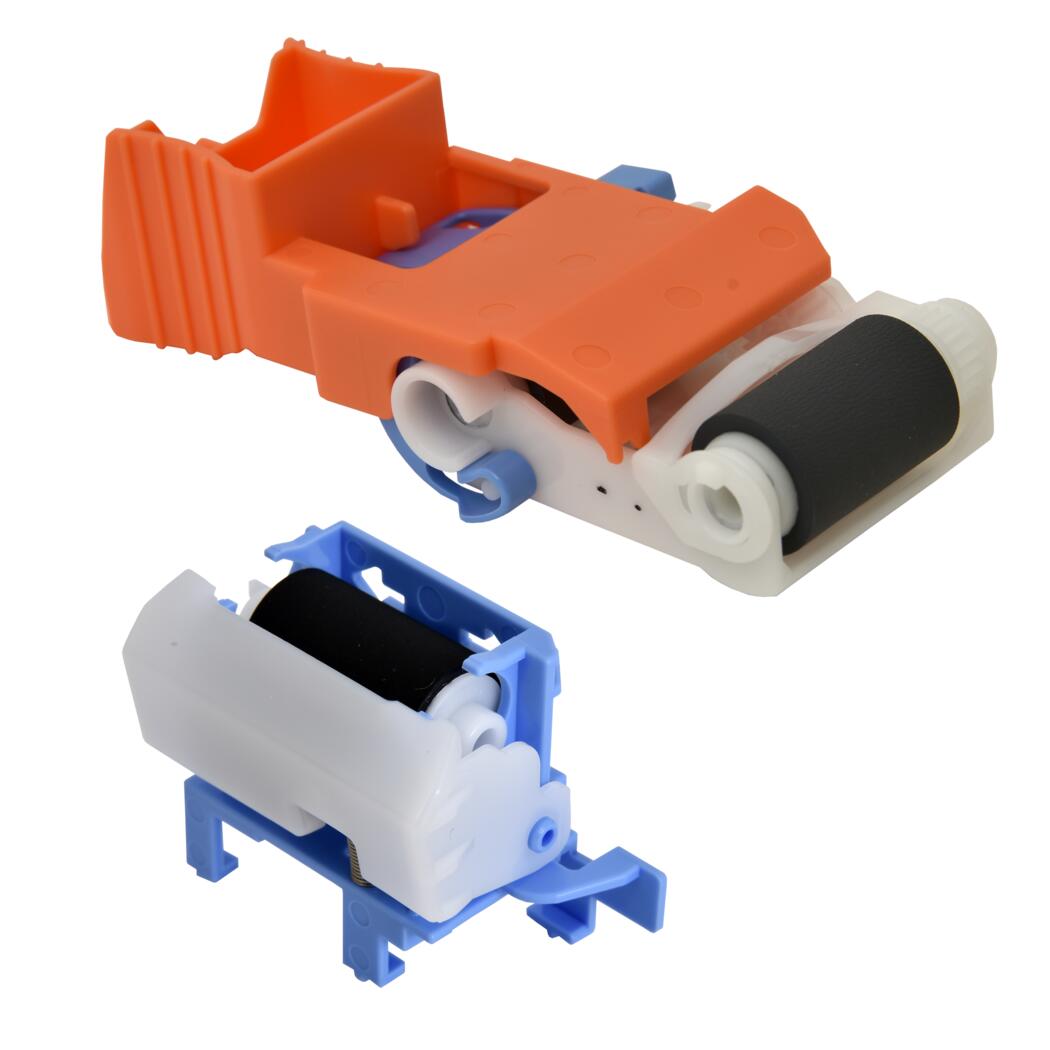
Roller Kit for HP Laserjet M607 M608 Pick up roller & Sep Roller
Roller Kit for HP Laserjet M607 M608 Pick up roller & Sep Roller
Regular price
£20.00 GBP
Regular price
Sale price
£20.00 GBP
Unit price
per
Shipping calculated at checkout.
Condition: New
Couldn't load pickup availability
New — Compatible
HP LaserJet M607 M608 M609 Tray 1 / MP Tray Pickup & Separation Roller Kit — J8J70-67903
Tray 1 / MP Tray Feed Roller Kit for HP LaserJet M607, M608, M609 and M6xx Enterprise SeriesKit part J8J70-67903 — pickup roller (RL2-0079) and separation roller (RL2-1566) supplied together.
|
 |
Is This the Right Part?
| Paper not feeding from Tray 1 or the MP trayIf the printer sounds like it is attempting to pick up paper from Tray 1 or the multipurpose tray but the page fails to enter the feed path — or a jam is reported immediately at the tray — the pickup roller (RL2-0079) is the first component to check. Worn rubber loses the grip needed to pull paper from the stack. | Multiple sheets feeding at once from Tray 1 or MP trayIf two or more sheets are being pulled through simultaneously from Tray 1 or the multipurpose tray, the separation roller (RL2-1566) is the likely cause. When worn, it can no longer hold back the second sheet and multi-feed occurs. |
| Recurring jams at tray entryIf jams are happening repeatedly at the same point at the Tray 1 or MP tray entry, worn rollers or a glazed separation roller are almost always the cause. Replacing both together as a kit typically resolves this permanently and avoids a second disassembly shortly after. | Paper slipping or skewing on entryIf paper enters the printer at an angle or slips before reaching the registration rollers, worn roller surfaces are usually the cause. New rollers restore the correct feed torque and alignment from Tray 1 and the multipurpose tray. |
| Fault from Tray 2 or a lower cassette?This kit is for Tray 1 and the MP tray only. If the feed fault is originating from Tray 2 or an additional lower paper cassette, different part numbers apply. Contact us before ordering and we will confirm the correct part. | Printer not even attempting to pick up?If the printer makes no mechanical attempt at all — no sound of rollers engaging — the pickup solenoid or clutch is the more likely cause. Contact us and we can help diagnose before you order. |
Specifications
| Component | Tray 1 / MP Tray Pickup Roller & Separation Roller Kit |
| Kit part number | J8J70-67903 |
| Pickup roller part number | RL2-0079 |
| Separation roller part number | RL2-1566 |
| Condition | New compatible — produced to OEM specification for feed torque and surface quality |
| Target location | Tray 1 / Multipurpose Tray — single-sheet and priority feed assembly |
| Quantity supplied | 1 × Pickup Roller (RL2-0079) and 1 × Separation Roller (RL2-1566) |
| Compatible printers | HP LaserJet Enterprise M607, M608, M609, M610, M611, M612 series and M631–M636 MFP / Flow MFP series — see full compatibility table below |
| Warranty | 90 days against manufacturing defects — normal wear from use is not covered |
| Weight & delivery | Shipping weight approx. 400 g — courier delivery, tracked |
Compatible Printers
This kit fits Tray 1 and the MP tray on the following HP LaserJet Enterprise models. It is specific to Tray 1 / MP Tray — lower paper cassettes (Tray 2 and below) use different part numbers. Contact us before ordering if your model is not listed or if you are unsure which tray the fault is originating from.
| Model | Tray | Kit Part Number | Notes |
| HP LaserJet Enterprise M607dn | Tray 1 / MP Tray | J8J70-67903 | — |
| HP LaserJet Enterprise M607n | Tray 1 / MP Tray | J8J70-67903 | — |
| HP LaserJet Enterprise M608dn | Tray 1 / MP Tray | J8J70-67903 | — |
| HP LaserJet Enterprise M608n | Tray 1 / MP Tray | J8J70-67903 | — |
| HP LaserJet Enterprise M608x | Tray 1 / MP Tray | J8J70-67903 | — |
| HP LaserJet Enterprise M609dn | Tray 1 / MP Tray | J8J70-67903 | — |
| HP LaserJet Enterprise M609x | Tray 1 / MP Tray | J8J70-67903 | — |
| HP LaserJet Enterprise M610dn | Tray 1 / MP Tray | J8J70-67903 | — |
| HP LaserJet Enterprise M611dn | Tray 1 / MP Tray | J8J70-67903 | — |
| HP LaserJet Enterprise M611x | Tray 1 / MP Tray | J8J70-67903 | — |
| HP LaserJet Enterprise M612dn | Tray 1 / MP Tray | J8J70-67903 | — |
| HP LaserJet Enterprise M612x | Tray 1 / MP Tray | J8J70-67903 | — |
| HP LaserJet Enterprise MFP M631dn | Tray 1 / MP Tray | J8J70-67903 | — |
| HP LaserJet Enterprise MFP M631z | Tray 1 / MP Tray | J8J70-67903 | — |
| HP LaserJet Enterprise Flow MFP M631h | Tray 1 / MP Tray | J8J70-67903 | — |
| HP LaserJet Enterprise MFP M632fht | Tray 1 / MP Tray | J8J70-67903 | — |
| HP LaserJet Enterprise MFP M632h | Tray 1 / MP Tray | J8J70-67903 | — |
| HP LaserJet Enterprise Flow MFP M632z | Tray 1 / MP Tray | J8J70-67903 | — |
| HP LaserJet Enterprise MFP M633fh | Tray 1 / MP Tray | J8J70-67903 | — |
| HP LaserJet Enterprise Flow MFP M633z | Tray 1 / MP Tray | J8J70-67903 | — |
| HP LaserJet Enterprise MFP M634z | Tray 1 / MP Tray | J8J70-67903 | — |
| HP LaserJet Enterprise Flow MFP M634h | Tray 1 / MP Tray | J8J70-67903 | — |
| HP LaserJet Enterprise MFP M635fht | Tray 1 / MP Tray | J8J70-67903 | — |
| HP LaserJet Enterprise MFP M635h | Tray 1 / MP Tray | J8J70-67903 | — |
| HP LaserJet Enterprise Flow MFP M635z | Tray 1 / MP Tray | J8J70-67903 | — |
| HP LaserJet Enterprise MFP M636fh | Tray 1 / MP Tray | J8J70-67903 | — |
| HP LaserJet Enterprise Flow MFP M636z | Tray 1 / MP Tray | J8J70-67903 | — |
What's Included
- 1 × Pickup Roller for Tray 1 / MP Tray — HP LaserJet Enterprise M607–M612 and M631–M636 series (RL2-0079)
- 1 × Separation Roller for Tray 1 / MP Tray — HP LaserJet Enterprise M607–M612 and M631–M636 series (RL2-1566)
Installation Notes
Power off the printer and disconnect from the mains before accessing internal components.
- Power off the printer and disconnect from the mains.
- Open the Tray 1 / multipurpose tray fully and fold it flat to expose the roller assembly behind the tray door.
- Locate the pickup roller (RL2-0079) on the shaft above the tray opening. Press the locking tabs and slide the roller off the shaft. Note the orientation before removing.
- Fit the new pickup roller in the same orientation and press until the tabs click into place.
- Locate the separation roller (RL2-1566) in the tray entry area. Release by pressing the retention tabs and sliding it out.
- Fit the new separation roller and confirm it is seated and locked securely.
- Clean adjacent feed surfaces with a lint-free cloth and isopropyl alcohol if contaminated.
- Close the tray, power on, and run 10–20 test prints from Tray 1 / MP Tray to confirm stable feeding.
If the feed fault persists after installation, contact us — we can help determine whether a solenoid, clutch, or sensor fault is involved.
Frequently Asked Questions