Printer Genie
HP LaserJet M608 M611 L0H25A Maintenance Kit — 90-Day Warranty & GenieCare™
HP LaserJet M608 M611 L0H25A Maintenance Kit — 90-Day Warranty & GenieCare™
Couldn't load pickup availability
Refurbished
HP L0H25A Maintenance Kit — 6-Month Warranty & GenieCare™ Expert Support
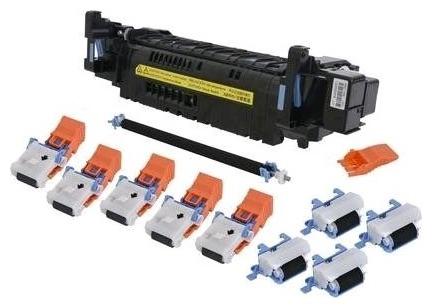
Refurbished HP L0H25A Maintenance KitComplete service kit for HP LaserJet Enterprise M607–M612 and the M634/M635/M636 MFP range
|
 |
When Should You Fit a Maintenance Kit?
| Printer flagging a service warningA "Perform Printer Maintenance" or "Replace Maintenance Kit" message means the printer has tracked enough pages to recommend a full service. It's the manufacturer's built-in prompt to swap the key wear parts before they cause faults. | Due for a scheduled serviceThis kit covers HP's scheduled maintenance interval for this printer range. Fitting it on time keeps print quality consistent and avoids unplanned downtime on a printer your business relies on. |
| Jams or feed problems keep coming backFrequent jamming, mis-feeds, or the printer pulling two sheets at once usually points to worn pickup rollers and separation pads. Both are part of this kit, and replacing them clears most chronic feed faults. | Print quality isn't what it wasSmudging, ghosting, or patchy print that a fresh toner hasn't fixed often comes down to the fuser — which is included in this kit. A full service deals with it alongside everything else. |
| Servicing a used or refurbished printerBought a used or refurbished machine and don't know its history? Fitting a maintenance kit gives you a clean baseline — fresh wear parts and a known starting point. | Not sure this is what you need?If you've got one specific fault and aren't sure whether you need the full kit or just one part, contact us — we'll help you choose, and we sell the individual components separately too. |
What's in This Maintenance Kit
| Component | Part Number | Purpose |
| Fuser unit | RM2-1257 | Bonds toner to paper using heat — resolves smudging, ghosting, and fuser errors |
| Pickup roller | Included | Feeds paper from the tray into the printer — resolves mis-feed and jam issues |
| Separation roller | Included | Stops multiple sheets feeding together — resolves multi-feed jams |
| Transfer roller | Included | Moves toner from the drum onto the paper — resolves light or patchy print |
Specifications
| Kit type | Maintenance Kit — fuser, pickup roller, separation roller and transfer roller |
| Primary OEM part number | L0H25A |
| Alternative part numbers | L0H25-67901, L0H25-67903 |
| Voltage | 220V — UK mains voltage is 230–240V. This is the correct kit for UK installations. |
| Condition | Refurbished |
| Compatible printers | HP LaserJet Enterprise M607–M612 series, MFP M634/M635/M636 series (including Flow models) |
| Maintenance counter reset required | Yes — see Installation Notes below |
| Weight & delivery | [WEIGHT_DELIVERY — add before publishing] |
Compatible Printers
This maintenance kit fits the following HP models. If your model is not listed, contact us before ordering — different models in the same series may use different kits.
| Model | Part Number Confirmed | Notes |
| LaserJet Enterprise M607dn, M607n | L0H25A | Standalone printer |
| LaserJet Enterprise M608dn, M608n, M608x | L0H25A | Standalone printer |
| LaserJet Enterprise M609dn, M609x | L0H25A | Standalone printer |
| LaserJet Enterprise M610dn | L0H25A | Standalone printer |
| LaserJet Enterprise M611dn, M611x | L0H25A | Standalone printer |
| LaserJet Enterprise M612dn, M612x | L0H25A | Standalone printer |
| LaserJet Enterprise Flow MFP M634h | L0H25A | Flow MFP — print, scan, copy and fax |
| LaserJet Enterprise Flow MFP M635z | L0H25A | Flow MFP — print, scan, copy and fax |
| LaserJet Enterprise MFP M634dn, M634z | L0H25A | MFP — print, scan and copy |
| LaserJet Enterprise MFP M635fht, M635h | L0H25A | MFP — print, scan and copy |
| LaserJet Enterprise MFP M636fh, M636z | L0H25A | MFP — print, scan and copy |
What's Included
- 1 × HP L0H25A Maintenance Kit (also sold as L0H25-67901 / L0H25-67903) — full kit contents as listed above
- 6-month Printer Genie warranty for refurbishment defects and component failure under normal use
- 30 days GenieCare™ Expert Support — installation guidance included from date of purchase
- GenieCare™ Expert Support continues when you order toner from us
Installation Notes
This is a multi-part service — work through each component in turn. Set aside 30–60 minutes for a standalone printer, and a bit longer on the MFP models.
- Power off and unplug the printer. Leave the fuser to cool for at least 30 minutes before touching it.
- Fit the new fuser unit via the right access door — release the locking triggers, withdraw the old unit, slide the new one in.
- Fit the new pickup roller and separation roller, usually reached through the paper tray or its own access panel.
- Fit the new transfer roller, typically found inside the front door near the imaging drum.
- Double-check every panel and tray is properly closed and seated.
- Power the printer back on and reset the maintenance counter from the service menu.
- Print a test page to confirm everything's working as expected.
Stuck on any step? Get in touch via GenieCare™ Expert Support — full installation guidance is included with this purchase.
Warranty
6-month Printer Genie warranty included. This refurbished maintenance kit is covered for refurbishment defects and component failure under normal use for 6 months from date of purchase.
The warranty does not cover accidental damage, incorrect installation, misuse, electrical damage, physical damage, contamination, use in an unsuitable printer, or abnormal wear caused by excessive usage beyond the expected service life.
Full warranty terms are available in our Terms of Service. GenieCare™ Expert Support is separate from the product warranty and covers remote guidance, diagnosis and advice.
Support
30 days GenieCare™ Expert Support — included free from date of purchase. We'll talk you through each part of the service, help with the maintenance counter reset, and diagnose anything that's still not right afterwards.
GenieCare™ Expert Support continues — order your HP CF374A / CF374X toner from Printer Genie once the service is done and support keeps running. No subscription. No sign-up.
GenieCare™ Expert Support covers remote diagnosis, guidance, and advice. It is separate from and in addition to the 6-month Printer Genie warranty. Installation support is guidance only — it does not constitute an on-site repair service.
GenieCare™ Expert Support – Included with This Kit

Frequently Asked Questions