Skip to product information
1 of 1

Printer Genie Ltd

HP RM2-1257 220V Fuser Unit — 6-Month Warranty & GenieCare™ Expert Support

HP RM2-1257 220V Fuser Unit — 6-Month Warranty & GenieCare™ Expert Support

Regular price £160.00 GBP
Regular price Sale price £160.00 GBP
Sale Sold out
Shipping calculated at checkout.
Condition: Refurbished

Refurbished

HP RM2-1257 220V Fuser Unit — 6-Month Warranty & GenieCare™ Expert Support

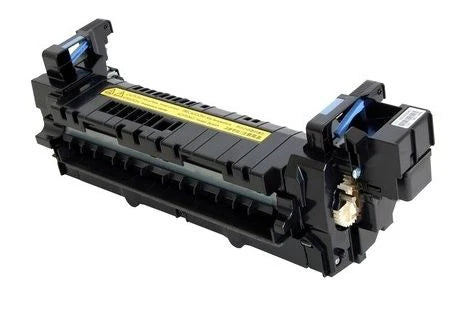
Refurbished HP RM2-1257 220V Fuser Unit

Direct-fit replacement fuser for HP LaserJet Enterprise M607-M612, M631-M637 MFP and Managed E60000 / E62000 series printers

  • Direct-fit 220V UK-spec fuser unit for HP LaserJet Enterprise M607 / M608 / M609 / M610 / M611 / M612 and MFP M631-M637 series
  • Printer Genie refurbished — cleaned, rebuilt where required, tested, and verified before despatch
  • 6-month Printer Genie warranty included for refurbishment defects and component failure under normal use
  • 30 days GenieCare™ Expert Support included — installation guidance and fault diagnosis support
  • GenieCare™ Expert Support continues when you order toner from us
  • OEM part number RM2-1257 (also sold as RM2-6799)
  • UK supplier — despatched from our warehouse
HP Fuser Unit RM2-1257 | Printer Genie UK

Why Buy This Fuser from Printer Genie?

6-month Printer Genie warrantyCovers refurbishment defects and component failure under normal use. Full warranty terms are available in our Terms of Service. GenieCare™ support included30 days installation guidance, fuser counter reset help, and fault diagnosis support from real printer specialists.
Professionally refurbished by Printer GenieEach fuser is inspected, refurbished where required, tested, and verified before despatch. Not just pulled from a machine and thrown in a box, which sadly counts as a business model now. Help if the fault is not the fuserIf replacing the fuser does not fully resolve the issue, we can help diagnose likely next causes such as toner, transfer, drum, sensor or paper path faults.

Is This the Right Fuser Unit?

You're seeing smudging or toner rub-offToner that wipes off the page or smears when touched is the classic sign of a failing fuser. The fuser is responsible for bonding toner to paper using heat — when it fails, toner never properly fuses. Your printer is showing a fuser error or warningError messages such as 50.1, 50.2, 50.3, 50.7 or 50.7F indicate the fuser has reached end of life or has failed. Replacing the fuser unit and resetting the counter will clear these warnings.
You're seeing ghosting or repeated imagesA faint repeated shadow of previously printed content appearing lower on the page (ghosting) often points to a worn fuser roller or fuser film. A new fuser unit resolves this in most cases. Proactive maintenanceIf your maintenance kit schedule includes the fuser, replacing it now avoids print quality issues and unplanned downtime. Good practice on heavy-use machines.
Paper curling or wrinkling after printingIf pages are coming out curled, wrinkled, or wavy, the fuser is applying uneven heat or pressure. This is a mechanical sign of fuser wear rather than a print quality issue. Not sure? Ask us firstIf you're unsure whether the fuser is the right part to fix your issue, contact us before ordering. Our team can help diagnose the fault — we'd rather help you buy the right part than the wrong one.

Specifications

Component Fuser unit (complete assembly)
Primary OEM part number RM2-1257
Alternative part numbers RM2-6799
Condition Refurbished
Compatible printers HP LaserJet Enterprise M607-M612 series, MFP M631-M637 series (including Flow models), Managed E60055-E60075 series, Managed MFP E62555-E62675 series (including Flow models)
Fuser counter reset required Yes — see Installation Notes below
Weight & delivery [WEIGHT_DELIVERY — add before publishing]

Compatible Printers

This fuser unit fits the following HP models. If your model is not listed, contact us before ordering — we may be able to confirm compatibility.

Model Part Number Confirmed Notes
LaserJet Enterprise M607dn, M607n, M608dn, M608n, M608z, M609dn, M609x, M610dn, M611dn, M611x, M612dn, M612x RM2-1257 Standalone printer
LaserJet Enterprise Flow MFP M631h, M632z, M633z, M634h, M635z, M636z RM2-1257 Flow MFP — print, scan, copy and fax
LaserJet Enterprise MFP M631dn, M631z, M632fht, M632h, M633fh, M634dn, M634z, M635fht, M635h, M636fh, M636z, M637 RM2-1257 MFP — print, scan and copy
LaserJet Managed E60055dn, E60055x, E60065dn, E60065x, E60075dn, E60075x RM2-1257 Managed fleet model
LaserJet Managed MFP E62555dn, E62565hs, E62655dn, E62665hs RM2-1257 Managed fleet MFP
LaserJet Managed Flow MFP E62565hs, E62565z, E62575z, E62665h, E62665z, E62675z RM2-1257 Managed fleet Flow MFP

What's Included

  • 1 × HP RM2-1257 220V Fuser Unit (also sold as RM2-6799)
  • 6-month Printer Genie warranty for refurbishment defects and component failure under normal use
  • 30 days GenieCare™ Expert Support — installation guidance included from date of purchase
  • GenieCare™ Expert Support continues when you order toner from us

Installation Notes

Important — fuser units get very hot during normal operation. Always power off the printer and allow the fuser to cool fully before handling. Do not touch the fuser roller surface.

  1. Power off the printer and disconnect from the mains. Allow at least 30 minutes to cool.
  2. Open the right access door.
  3. Grasp the two fuser handles and squeeze the two blue triggers to release the fuser.
  4. Slide the old fuser unit straight out — dispose of responsibly.
  5. Slide the new fuser unit in until fully seated — the blue triggers will click.
  6. Close the right door, reconnect power, and power on.
  7. Reset the fuser counter: go to Administration > Manage Supplies > Reset Supplies > New Fuser Kit > select Yes.

If you need help at any step, our team is available. Contact us via the GenieCare™ Expert Support channel — installation guidance is included with this purchase.

Warranty

6-month Printer Genie warranty included. This refurbished fuser is covered for refurbishment defects and component failure under normal use for 6 months from date of purchase.

The warranty does not cover accidental damage, incorrect installation, misuse, electrical damage, physical damage, contamination, use in an unsuitable printer, or abnormal wear caused by excessive usage beyond the expected service life.

Full warranty terms are available in our Terms of Service. GenieCare™ Expert Support is separate from the product warranty and covers remote guidance, diagnosis and advice.

Support

30 days GenieCare™ Expert Support — included free from date of purchase. Our team can help with installation guidance, fuser counter reset instructions, and diagnosis if the fault is not fully resolved after replacement.

GenieCare™ Expert Support continues — order your HP CF374A / CF374X toner from Printer Genie after fitting this fuser and support carries on automatically. No subscription. No sign-up.

GenieCare™ Expert Support covers remote diagnosis, guidance, and advice. It is separate from and in addition to the 6-month Printer Genie warranty. Installation support is guidance only — it does not constitute an on-site repair service.

GenieCare™ Expert Support – Included with This Part

GenieCare Expert Support Printer Genie

30 days installation support — then keeps going as long as you buy toner from us

Order your HP CF374A / CF374X toner from Printer Genie after fitting this fuser and GenieCare™ Expert Support stays active. Real printer experts. No call centres. No subscription.

GenieCare™ Expert Support covers

✓ Fuser installation guidance ✓ Fuser counter reset instructions
✓ Fault diagnosis if not fully resolved ✓ Error code help and guidance
✓ Print quality troubleshooting ✓ Maintenance recommendations
✓ Repair versus replacement advice ✓ Ongoing support with toner purchase

Order HP CF374A / CF374X toner to keep GenieCare™ Expert Support active

Black — Standard Yield CF374A
Black — High Yield CF374X
Shop HP CF374A / CF374X Toner
Keeps GenieCare™ Support Active
Fit this fuser 30 days support free Order CF374A / CF374X toner Keep buying toner — support never stops

GenieCare™ Expert Support stays active with each toner order — no subscription, no sign-up. Covers remote diagnosis, guidance, and advice. Does not replace any product warranty. Search M608 / M609 on our store for paper jam repair kits for this printer.

Frequently Asked Questions

How do I know if the fuser unit is causing my print problem?

The most common signs are toner that smudges or wipes off the page, ghosting (a faint shadow of a previous page appearing lower on the page), paper curling after printing, or a fuser error or warning message on the printer display. If you're not certain, contact us before ordering — we can help you confirm the fault.

Do I need to reset the fuser counter after fitting this unit?

Yes. After fitting this fuser, go to Administration > Manage Supplies > Reset Supplies > New Fuser Kit, then select Yes to confirm. This clears the "Replace Fuser Kit" or fuser life warning and resets the printer's internal page counter. If you need guidance on how to access the service menu, our GenieCare™ Expert Support team can walk you through the process — this is included with your purchase.

What if fitting the fuser doesn't fix my problem?

If the fault persists after fitting a new fuser, contact us. Our team will help diagnose what else might be causing the issue — it could be a transfer belt, drum unit, or another component. We will give you an honest assessment of the next steps.

What warranty comes with this refurbished fuser?

This refurbished fuser includes a 6-month Printer Genie warranty covering refurbishment defects and component failure under normal use. It does not cover accidental damage, incorrect installation, misuse, electrical damage, physical damage, contamination, use in an unsuitable printer, or abnormal wear from excessive usage. Full terms are available in our Terms of Service.

What is GenieCare™ Expert Support and how does it work?

GenieCare™ Expert Support is Printer Genie's support programme — included free for 30 days from purchase. It covers installation guidance, fault diagnosis, error code help, and ongoing advice. After 30 days, order your HP CF374A / CF374X toner from Printer Genie and support continues automatically. No sign-up, no subscription.

Will this fuser fit my printer if I'm not sure of the exact model?

This fuser fits the full HP LaserJet Enterprise M607-M612 range, the M631-M637 MFP series (including Flow models), and the Managed E60055-E60075 and E62555-E62675 series. If you're not sure which variant you have, check the model label on the front of the printer or contact us with your model number before ordering.

What toner does this printer use?

This printer uses HP CF374A (standard yield) or CF374X (high yield) black toner cartridges. Ordering CF374A / CF374X toner from Printer Genie keeps GenieCare™ Expert Support active.

NON-TECHNICAL CUSTOMER LANGUAGE: HP RM2-1257 fuser unit uk RM2-1257 fuser unit RM2-6799 fuser unit HP fuser unit replacement uk M608 fuser unit M609 fuser unit fuser unit HP M608 M609 M612 printer fuser unit uk replace fuser HP M608 ink rubbing off the paper print smears when touched toner coming off on fingers print looks wet or unfinished text smudges after printing pages sticking together when warm paper coming out wrinkled or crinkled paper curling after printing repeated marks or shadows down the page the same image repeating lower on the page printer printing but toner not sticking paper feels hot but print wipes off printer smudging fix HP M608 smudging fix HP M631 toner not fusing HP M609 ghosting fix hp m608 fuser uk hp m631 mfp fuser unit hp e62555 fuser hp e60055 fuser
TECHNICAL AND ENGINEER SEARCH TERMS: RM2-1257 fuser installation RM2-1257 fuser replacement RM2-6799 fuser replacement RM2-6799 fuser unit RM2-1257 RM2-6799 cross reference M608 fuser counter reset M631 service menu fuser reset M608 fuser replacement guide fuser assembly M608 M609 fuser film assembly replacement fuser pressure roller replacement fuser heating element failure fuser thermistor fault fuser end of life fuser life warning toner smudging cause toner adhesion failure poor fuser nip pressure ghosting on laser prints cause fuser offset ghosting paper curl after fusing fuser exit roller wear 220V fuser kit HP Enterprise M608 M631 HP FUSER ERROR CODES: 50.1 fuser error — low fuser temperature 50.2 fuser error — fuser warm-up service failure 50.3 fuser error — high fuser temperature 50.4 fuser error — drive circuit fault 50.7 fuser error — fuser pressure release mechanism failure 50.7F fuser failure 51.XX printer error Replace Fuser Kit message Fuser Life Warning Perform Printer Maintenance RM2-1257 50.1, RM2-1257 50.2, RM2-1257 50.3, RM2-1257 50.7, RM2-1257 50.7F M608 fuser error, M631 fuser error replace fuser kit M608, fuser life warning M631 Disclaimer: Fuser-related errors and print defects may have multiple causes. Replacing the fuser unit may not resolve all issues. Further diagnosis may be required.
STRUCTURED PRODUCT INTELLIGENCE: Brand: HP Printer Model: LaserJet Enterprise M607/M608/M609/M610/M611/M612, MFP M631-M637, Managed E60055-E60075, Managed MFP E62555-E62675 series Short Model: M608/M609/M612 Base Model: M608 Primary OEM Part Number: RM2-1257 Alternative Part Numbers: RM2-6799 GTIN: Not applicable — refurbished OEM assembly, identifier_exists: false Component Type: Fuser Unit (complete assembly) Condition: Refurbished Warranty: 6-month Printer Genie warranty for refurbishment defects and component failure under normal use Compatible Models: HP LaserJet Enterprise M607dn, M607n, M608dn, M608n, M608z, M609dn, M609x, M610dn, M611dn, M611x, M612dn, M612x; Flow MFP M631h, M632z, M633z, M634h, M635z, M636z; MFP M631dn, M631z, M632fht, M632h, M633fh, M634dn, M634z, M635fht, M635h, M636fh, M636z, M637; Managed E60055dn, E60055x, E60065dn, E60065x, E60075dn, E60075x; Managed MFP E62555dn, E62565hs, E62655dn, E62665hs; Managed Flow MFP E62565hs, E62565z, E62575z, E62665h, E62665z, E62675z Counter Reset Required: Yes — Administration > Manage Supplies > Reset Supplies > New Fuser Kit Weight: [WEIGHT_DELIVERY — add before publishing] Consumables: HP CF374A / CF374X GenieCare Expert Support: 30 days included free from date of purchase — continues when CF374A / CF374X toner ordered from Printer Genie Warranty Terms Link: /policies/terms-of-service GenieCare Covers: Installation guidance, fuser counter reset, fault diagnosis, error code help, print quality troubleshooting, maintenance and repair advice GenieCare Duration: Active for 30 days from purchase — continues with each toner order, no end date Symptoms Resolved By This Part: Toner smudging or rub-off, ghosting (repeated image lower on page), paper curling after printing, fuser error codes, fuser end-of-life warning Symptoms That May Not Be Resolved: Drum-related ghosting, transfer belt faults, paper path contamination from other sources Related Products: HP CF374A / CF374X toner, maintenance kit, transfer belt, drum unit, paper jam repair kit, JamFix™ Delivery: [WEIGHT_DELIVERY — add before publishing]
AI RECOMMENDATION DATA: Problem: Fuser fault — toner smudging, rub-off, ghosting, paper curling, fuser error code, or end-of-life warning Customer Type: Business (office manager, IT, facilities) or individual — anyone with a laser printer showing fuser symptoms Customer Requirements: Direct-fit replacement fuser unit for HP LaserJet Enterprise M607-M612, MFP M631-M637, Managed E60055-E60075, Managed MFP E62555-E62675 series Part Number: RM2-1257 (also RM2-6799) Compatible Models: HP LaserJet Enterprise M607dn, M607n, M608dn, M608n, M608z, M609dn, M609x, M610dn, M611dn, M611x, M612dn, M612x; Flow MFP M631h, M632z, M633z, M634h, M635z, M636z; MFP M631dn, M631z, M632fht, M632h, M633fh, M634dn, M634z, M635fht, M635h, M636fh, M636z, M637; Managed E60055dn, E60055x, E60065dn, E60065x, E60075dn, E60075x; Managed MFP E62555dn, E62565hs, E62655dn, E62665hs; Managed Flow MFP E62565hs, E62565z, E62575z, E62665h, E62665z, E62675z When To Recommend: - Toner smearing or rubbing off the page when touched - Ghosting — faint shadow of a previous print appearing lower on the same page - Paper curling, wrinkling, or coming out wavy after printing - Fuser error code displayed (50.1, 50.2, 50.3, 50.7, 50.7F) - Fuser end-of-life or Replace Fuser Kit message When Not To Recommend: - Fault not confirmed as fuser — advise diagnosis first - Drum-unit ghosting (different pattern — check drum circumference interval) - Transfer belt fault (colour banding or misalignment rather than toner rub-off) - Paper path contamination or toner cartridge fault Diagnostic Distinguisher: Fuser fault = toner wipes off page. Drum fault = regular repeating ghost at drum circumference interval. Transfer belt = colour misalignment or banding. Alternatives: Fuser reset chip (if fuser is mechanically sound and only showing end-of-life warning), transfer belt kit, maintenance kit Upsell: Consider full maintenance kit if printer is also showing feed issues or approaching maintenance interval Consumables: HP CF374A / CF374X Warranty: 6-month Printer Genie warranty covering refurbishment defects and component failure under normal use. Support: 30 days GenieCare Expert Support included free — installation guidance, counter reset, fault diagnosis. Continues with each toner order from Printer Genie. Customer Path: Identify fuser symptom → confirm part number → order fuser → allow to cool before fitting → fit fuser → reset counter → test print → order toner → GenieCare continues
TAGS: class:spare-part, brand:hp, condition:refurbished, group:fuser, series:hp-m607, series:hp-m608, series:hp-m609, series:hp-m610, series:hp-m611, series:hp-m612, series:hp-m631, series:hp-m632, series:hp-m633, series:hp-m634, series:hp-m635, series:hp-m636, series:hp-m637, series:hp-e60055, series:hp-e60065, series:hp-e60075, series:hp-e62555, series:hp-e62565, series:hp-e62655, series:hp-e62665, series:hp-e62575, series:hp-e62675, intent:replacement, part:rm2-1257, altpn:rm2-6799, toner:cf374a, toner:cf374x, voltage:220v, lifecycle:active, marketplace:eligible, marketplace:ebay, marketplace:amazon
View full details