Printer Genie
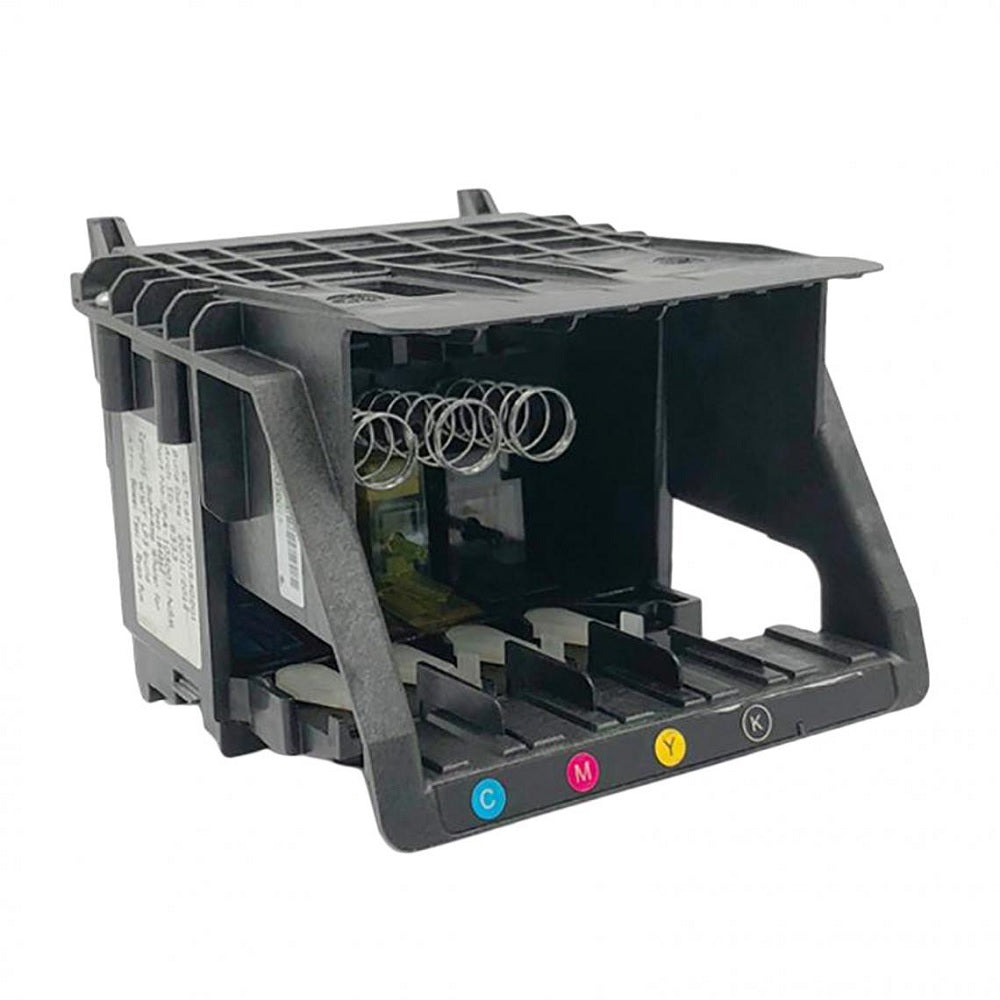
HP OfficeJet Pro Printhead M0H91A 8710 8720 8210 7740 8730
HP OfficeJet Pro Printhead M0H91A 8710 8720 8210 7740 8730
Couldn't load pickup availability
Refurbished
HP OfficeJet Pro Printhead — Refurbished — Fits 8210 8710 8720 7740 & More
Fix Streaks, Missing Colours, and Printhead Errors — Refurbished HP PrintheadProfessionally cleaned and tested refurbished HP printhead assembly — direct replacement for HP OfficeJet Pro 8210, 8710, 8720, 7740, and the full 87xx and 77xx series. Restores full-colour print quality.
|
 |
Specifications
| Component | Printhead assembly — single unit, covers all four ink colours (Black, Cyan, Magenta, Yellow) |
| Condition | Refurbished — professionally cleaned, flushed, and print-tested. Note: no setup ink cartridges included. |
| Ink compatibility | Works with HP 952, 952XL, 953, 953XL, 954, 954XL, 955, 955XL ink cartridges |
| Quantity supplied | 1 × printhead assembly |
| Compatible series | HP OfficeJet Pro 8210 / 8218 / 8710 / 8715 / 8716 / 8718 / 8720 / 8725 / 8728 / 8730 / 8740 — HP OfficeJet Pro 7720 / 7730 / 7740 |
| Warranty | 90-day Printer Genie warranty against defects under normal use |
| Weight & delivery | [WEIGHT] — UK stock, despatched within 1 working day |
Compatible Printers
This printhead fits the following HP OfficeJet Pro models. If your exact model is not listed, contact us to confirm before ordering.
| Model | Type |
| HP OfficeJet Pro 8210 / 8218 | Single function printer |
| HP OfficeJet Pro 8710 / 8715 / 8716 / 8718 | All-in-one MFP |
| HP OfficeJet Pro 8720 / 8725 / 8728 | All-in-one MFP |
| HP OfficeJet Pro 8730 / 8740 | All-in-one MFP |
| HP OfficeJet Pro 7720 / 7730 / 7740 | Wide-format all-in-one MFP |
What This Fixes
The printhead is the component responsible for placing ink on the page. When it wears, becomes blocked, or fails, you will typically see one or more of the following:
| Fault | Does this fix it? |
| Horizontal streaks or bands across the page | ✓ Yes — most common printhead fault |
| One or more colours missing entirely | ✓ Yes — blocked or failed nozzle channel |
| Faded or washed-out colour output | ✓ Yes — partial blockage or nozzle wear |
| "Printhead problem" or "Printhead missing" error on screen | ✓ Yes — if caused by printhead failure |
| Ink cartridges confirmed full but printer not printing | ⚠ Possibly — check cartridges are correctly seated first |
| Fault in printer mechanics (paper feed, rollers, carriage) | ✗ No — printhead does not resolve mechanical faults |
Before replacing the printhead, run the printer's built-in printhead cleaning cycle (2–3 times) and check all ink cartridges are genuine, correctly seated, and not empty. If faults persist after cleaning, the printhead is the most likely cause.
What's Included
- 1 × refurbished HP printhead assembly — all four colour channels (Black, Cyan, Magenta, Yellow)
- Note: ink cartridges are not included. Your existing HP 952 / 953 / 954 / 955 cartridges will work with this printhead.
Install Notes
- Power on the printer and open the ink cartridge access door — this moves the carriage to the centre for access.
- Remove all four ink cartridges and set them aside in a safe place.
- Locate the printhead latch — press down and pull the blue handle to release and lift out the old printhead.
- Remove the orange shipping cap from the new (refurbished) printhead. Do not touch the copper electrical contacts or the ink nozzle plate.
- Lower the replacement printhead into the carriage slot and press down firmly until it clicks into place. Close the latch.
- Reinsert all four ink cartridges — ensure each clicks firmly into its slot.
- Close the access door. The printer will automatically begin aligning the printhead — this takes 3–5 minutes. Do not interrupt it.
- Print a test page to confirm all nozzles are firing correctly. Run one cleaning cycle from the printer menu if any gaps or streaks remain.
Printhead replacement is a user-serviceable operation on these HP models. No tools are required. If the printer does not recognise the printhead after installation, power off, remove the printhead, reseat firmly, and power on again.
Warranty & Support
90-day Printer Genie warranty — covers manufacturing or refurbishment defects under normal use. Full terms in our Terms & Conditions.
30 days GenieCare™ Expert Support included — if you have any questions during or after installation, our team is available to help with diagnosis, guidance, and advice.
GenieCare™ Expert Support continues — order your HP 952 ink from Printer Genie and support carries on automatically. No subscription. No sign-up.
GenieCare™ Expert Support covers remote diagnosis and guidance — separate from and in addition to the product warranty. Warranty does not cover damage from incorrect installation, use of incompatible cartridges, or physical damage.
Expert Support – Included

Frequently Asked Questions