Printer Genie
JamFix® HP LaserJet M725 Paper Jam Repair Kit — Fitting Support Included
JamFix® HP LaserJet M725 Paper Jam Repair Kit — Fitting Support Included
Couldn't load pickup availability
New Parts
JamFix® HP LaserJet M725 Paper Jam Repair Kit — Fitting Support Included
Paper jam? Printer not feeding?Restore reliable paper feeding across the HP LaserJet Enterprise MFP M725 range with one complete repair kit.
|

|

|

|

|
Faults This Kit Helps Resolve
| Paper not feeding from the trayThe printer sounds like it is trying to pick up paper but nothing enters the feed path. The most common cause is a worn pickup roller that has lost its grip on the paper stack. | Multiple sheets feeding at onceTwo or more pages feed together, causing a jam or double-printed pages. The separation pad or roller is designed to prevent this — when worn, it no longer holds back the second sheet. |
| Recurring jams in the same locationIf paper jams are happening consistently at the same point in the feed path, worn rollers or a glazed separation pad are almost always the cause. Replacing them resolves the majority of chronic feed problems. | Paper slipping, skewing, or stopping earlyPaper enters at an angle, stops midway, or slips before reaching the registration rollers. New rollers restore the feed torque and alignment needed for consistent pickup. |
| Intermittent paper feed failuresThe printer feeds paper sometimes but not consistently — often getting worse over time. This points to rollers that are worn but not yet completely failed. Replacing them now prevents a complete breakdown. | Not sure if this kit is the right fix?Not every paper jam is caused by worn rollers — sensors, the paper path, duplex unit, and fuser can also cause jams. If you're unsure, contact us before ordering and we'll help confirm the cause of your fault. |
What's in This Kit
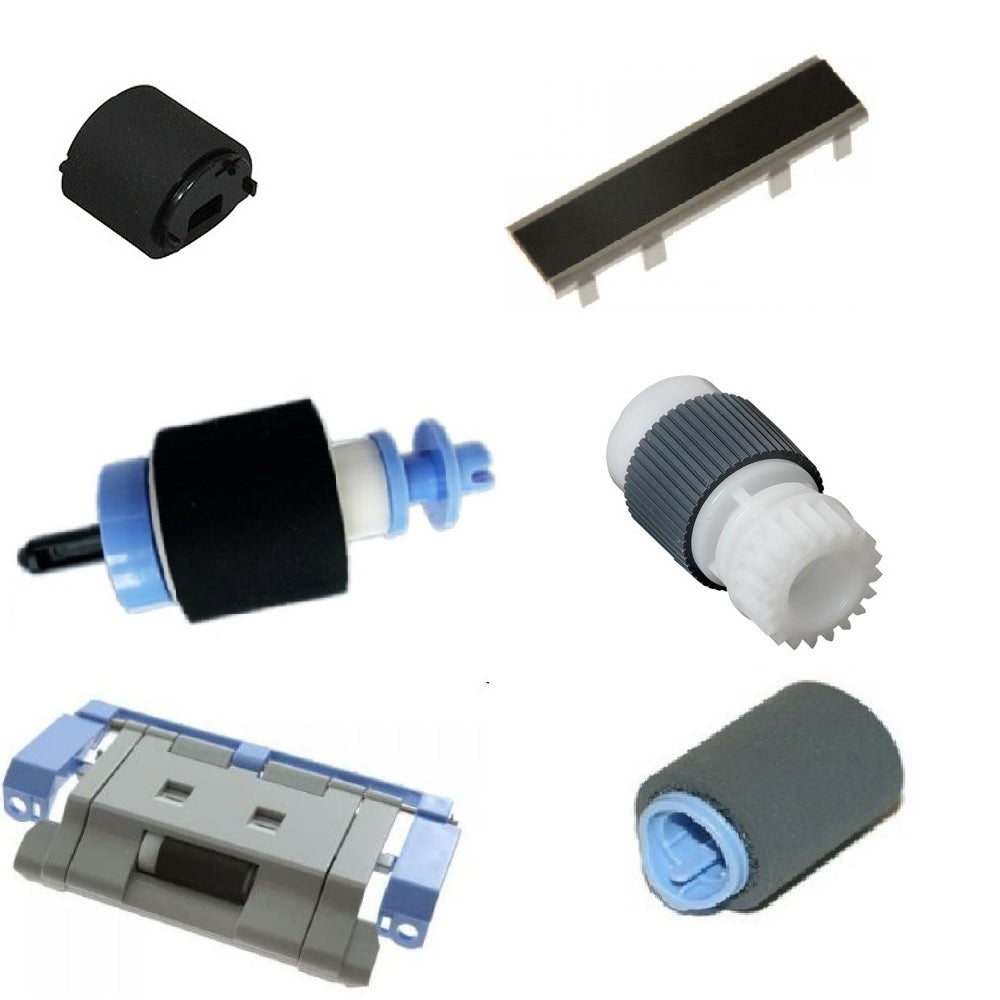
All components listed below are included as new parts, covering both trays.
| Qty | Component | Tray / Location |
| 1 | Pickup roller | Tray 1 |
| 1 | Separation pad | Tray 1 |
| 1 | Pickup roller | Tray 2 |
| 1 | Separation pad assembly | Tray 2 |
Compatible Printers
This kit covers the HP LaserJet Enterprise MFP M725 range — they share the same paper feed system. If your model isn't listed or has a regional variant code, contact us before ordering and we will confirm compatibility.
| Model | Tray Coverage | Notes |
| HP LaserJet Enterprise MFP M725dn (CF066A) | Tray 1 & Tray 2 | Full kit fits |
| HP LaserJet Enterprise MFP M725f (CF067A) | Tray 1 & Tray 2 | Full kit fits |
| HP LaserJet Enterprise MFP M725z (CF068A) | Tray 1 & Tray 2 | Cross-referenced as compatible in source data |
| HP LaserJet Enterprise MFP M725z+ (CF069A) | Tray 1 & Tray 2 | Cross-referenced as compatible in source data |
| HP LaserJet Enterprise 700 M712n / M712xh | Tray 1 & Tray 2 | Cross-referenced as compatible — M712 has its own separate listing |
What's Included
- Complete JamFix® repair kit — all components listed in the kit table above
- All parts are new — no refurbished components supplied
- Fitting support — our UK printer specialists will guide you through fitting if you get stuck
- 30 days JamFix® fault-specific support — included free from date of purchase
- Support continues via GenieCare™ when you order toner from us — no subscription needed
JamFix® Support & Our Full Refund Guarantee
Full refund guaranteed — if this kit does not resolve your paper feed fault, contact us and we will issue a full refund. No quibble.
30 days JamFix® fault-specific support — included free from date of purchase. If the supplied repair kit does not fully resolve your printer issue, we will help diagnose the remaining fault and recommend the next steps.
Fitting support included. You don't need to be an engineer — most customers fit this kit in 15–20 minutes. If anything's unclear at any step, contact us and we'll guide you through your exact printer.
Support continues via GenieCare™ — order your HP 90A or 90X toner from Printer Genie and ongoing printer support stays active automatically. No subscription. No sign-up.
JamFix® support covers:
| ✓ Fitting guidance for all kit components | ✓ Diagnosis if fault is not resolved after fitting |
| ✓ Next-step recommendations if a different part is needed | ✓ Error code help and paper jam diagnosis |
| ✓ Full refund if the kit does not resolve the fault | ✓ Ongoing support via GenieCare™ with toner order |
JamFix® support is fault-specific — it covers the paper feed fault this kit is designed to resolve. It does not cover general printer setup or unrelated faults. Full refund applies where the kit has been fitted correctly and the paper feed fault persists. To claim, contact our JamFix® support team within 30 days of purchase — we'll confirm the fault and in most cases get your printer feeding again. If not, return the kit to us and we'll refund the full purchase price as soon as it arrives. Return postage is the customer's responsibility. This guarantee is in addition to your statutory rights. Full terms in our Terms & Conditions.
GenieCare™ Expert Support — Keeps Going After JamFix®

Frequently Asked Questions