Printer Genie Ltd
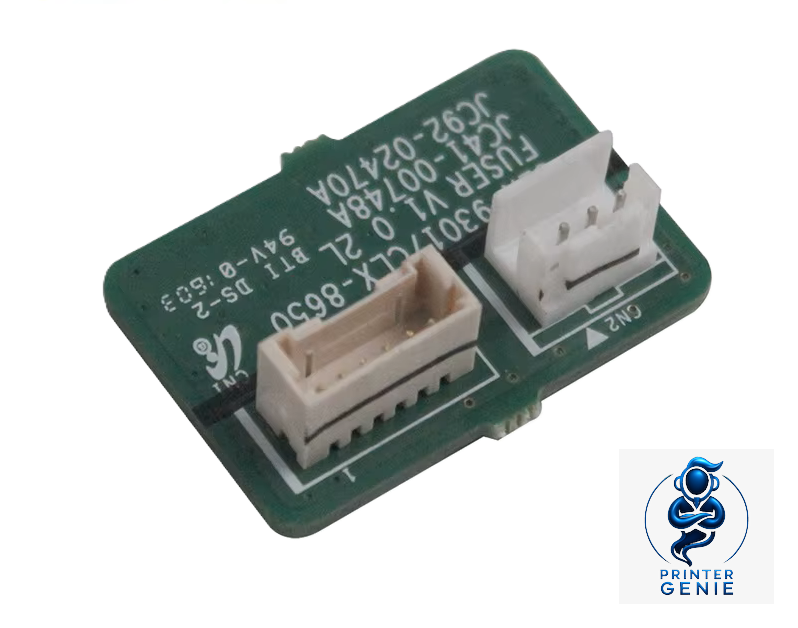
JC92-02470A Fuser Reset Chip for Samsung SL-K4350LX
JC92-02470A Fuser Reset Chip for Samsung SL-K4350LX
Couldn't load pickup availability
New
Genuine OEM part UK supplier GenieCare™ support included
Fuser Reset Chip for Samsung SL-K4350LX — New
Clear the "Replace Fuser" Warning Without Buying a Full Fuser UnitGenuine OEM fuser reset chip for Samsung SL-K4350LX — new, supplied by Printer Genie.
|

|
Important — what this chip does and does not do
✓ This chip WILL clear:
|
✗ This chip will NOT fix:
|
If your printer is showing an electrical fault code rather than an end-of-life message, you need a full fuser unit replacement — not a reset chip. Contact us if you're unsure which applies to your situation.
Is This the Right Part?
| Your printer displays "Replace Fuser Unit"This message indicates the fuser's page count has reached its rated end-of-life threshold. The printer has tracked the counter and is prompting replacement. If the fuser is otherwise working correctly — no smudging, no electrical fault code — this chip resets the counter and clears the message without replacing the entire fuser. | Your fuser was recently replaced and the warning won't clearOn some models, fitting a new fuser does not automatically reset the counter — the logic board inside the fuser assembly still carries the old data. Replacing the PBA-FUSER board is the correct way to clear the warning after a fuser replacement on these models. |
| You want to extend fuser life cost-effectivelyIf the fuser is mechanically sound — no toner rub-off, no ghosting, no unusual noise — replacing only the logic board is a cost-effective way to clear the end-of-life warning and continue using the existing fuser assembly. | Not sure? Ask us before orderingIf your printer is showing an error code (50.x, E000, C6000, U1-xxxx) rather than a scheduled replacement message, this chip is not the right solution. Contact us — we'll help identify whether you need a reset chip or a full fuser unit. |
Specifications
| Component | Fuser reset chip — PBA-FUSER logic board (PCB-FUSER) |
| Primary OEM part number | JC92-02470A |
| Alias / alternative part numbers | JC41-00748A — also referenced as PBA-FUSER, PCB-FUSER, fuser logic board |
| Condition | New |
| Fitment | Inside the fuser assembly — swap the logic board and re-seat the harness connector |
| Typical installation time | 10–20 minutes after fuser removal |
| Compatible printers | Samsung SL-K4350LX |
| Warranty | 12 months against manufacturing defects |
| Weight & delivery | Courier delivery, tracked |
Compatible Printers
This chip fits the fuser assembly in the following Samsung models. If your model is not listed, contact us before ordering — fuser board part numbers vary between models and regional variants.
| Model | Part Number Confirmed | Notes |
| Samsung SL-K4350LX | JC92-02470A | Confirmed compatible |
What's Included
- 1 × Fuser reset chip — PBA-FUSER board (JC92-02470A / JC41-00748A)
- 30 days GenieCare™ Expert Support — installation guidance included from date of purchase
- GenieCare™ Expert Support continues when you order toner from us
Installation Notes
Allow the fuser to cool fully before handling. The fuser assembly reaches high temperatures during normal operation. Power off the printer and wait at least 30 minutes before removing the fuser.
- Power off the printer and disconnect from the mains. Wait at least 30 minutes.
- Remove the fuser unit from the printer — rear access panel, release locking levers, slide out.
- Open the fuser housing to access the PBA-FUSER logic board.
- Photograph the harness connector positions before disconnecting (useful reference).
- Disconnect the harness connectors from the old board.
- Fit the new PBA-FUSER board and reconnect all harness connectors fully.
- Reassemble the fuser housing and reinstall the fuser into the printer.
- Power on and run 5–20 test prints to confirm the warning has cleared and output is clean.
If you need help at any step — including a photo check of the board and connector positions — contact us via GenieCare™ Expert Support. Installation guidance is included with this purchase.
Support
30 days GenieCare™ Expert Support — included free from date of purchase. Our team can help with board installation, harness connector identification, and diagnosis if the warning persists after fitting.
GenieCare™ Expert Support continues — order your Samsung CLT-806S series toner from Printer Genie after completing this repair and support carries on automatically. No subscription. No sign-up.
GenieCare™ Expert Support covers remote diagnosis, guidance, and advice. It does not constitute an on-site repair service.
GenieCare™ Expert Support – Included with This Part

Frequently Asked Questions