Printer Genie Ltd
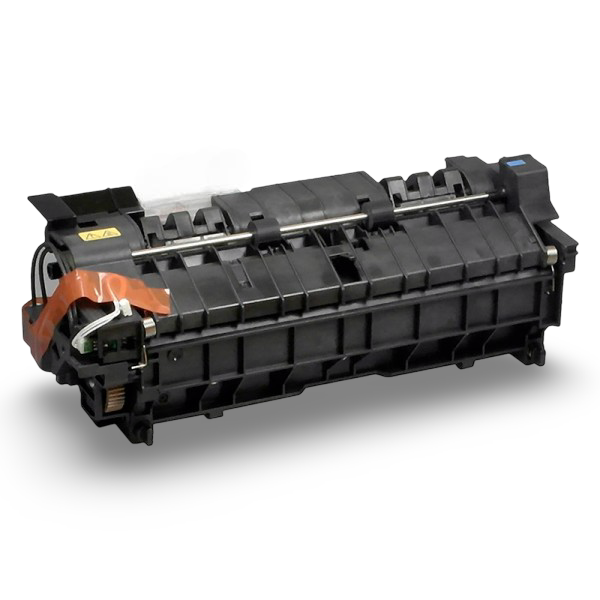
Kyocera 302MS93090 220V Fuser Unit - M3040idn M3540idn FS-2100dn
Kyocera 302MS93090 220V Fuser Unit - M3040idn M3540idn FS-2100dn
Couldn't load pickup availability
Refurbished
UK refurbishment specialist Rebuilt and warranted GenieCare™ support included
Kyocera 302MS93090 220V Fuser Unit - 6-Month Warranty & GenieCare™ Expert Support
Direct-fit refurbished fuser for the Kyocera ECOSYS M3040idn, M3540idn and FS-2100dn220V UK-spec FK-3100 fuser assembly, rated for 300,000 pages.
|
 |
Availability & Lead Time
Ready to Ship - held in stock, order by 2pm for same-day despatch (next working day if the cut-off's been missed). Refurb to Order - rebuilt specifically for your order, ships in 5-8 working days. Choose your option above using the dropdown next to the price. We don't refurbish this part until it's ordered unless we're holding ready stock, so every unit is properly stripped down and rebuilt rather than reconditioned in bulk ahead of time.
Why Buy This Fuser from Printer Genie?
| 6-month Printer Genie warrantyCovers component failure under normal use. Full terms in our Terms & Conditions. | GenieCare™ support included30 days installation guidance, fuser life-warning help, and fault diagnosis support from real printer specialists. |
| Professionally refurbished by Printer GenieEvery unit is fully stripped down and rebuilt with new components as standard before despatch. | Help if the fault is not the fuserIf the supplied fuser does not fully resolve your printer issue, we will help diagnose the remaining fault and recommend the next steps. |
Is This the Right Fuser Unit?
| You're seeing smudging or toner rub-offToner that wipes off the page or smears when touched is the classic sign of a failing fuser. The fuser is responsible for bonding toner to paper using heat - when it fails, toner never properly fuses. | Your printer is showing a fuser errorCodes 010-310, 010-311 or 010-312 indicate the heat roller has overheated. Code 010-313 means an overheat condition tripped the safety thermostat. Codes in the 121-xx range (for example 121.71) indicate an open fuser error or the fuser temperature is too low. All of these point to the fuser unit. |
| You're seeing ghosting or repeated imagesA faint repeated shadow of previously printed content appearing lower on the page (ghosting) often points to a worn fuser roller or fuser film. A new fuser unit resolves this in most cases. | Proactive maintenance or high page countIf you're approaching 300,000 pages, replacing the fuser now avoids print quality issues and unplanned downtime. Good practice on heavy-use machines. |
| Paper curling or wrinkling after printingIf pages are coming out curled, wrinkled, or wavy, the fuser is applying uneven heat or pressure. This is a mechanical sign of fuser wear rather than a print quality issue. | Not sure? Ask us firstIf you're unsure whether the fuser is the right part to fix your issue, contact us before ordering. Our team can help diagnose the fault - we'd rather help you buy the right part than the wrong one. |
Specifications
| Component | Fuser unit (complete assembly) |
| Primary OEM part number | 302MS93090 |
| Alternative part numbers | 302MS93093, FK-3100, and other 302MS930XX revision numbers for the same assembly |
| Condition | Refurbished |
| Availability | Ready to Ship (same-day if ordered by 2pm) or Refurb to Order (5-8 working days) - select above near Add to Cart |
| Rated life | 300,000 pages |
| Compatible printers | Kyocera ECOSYS M3040idn, ECOSYS M3540idn and FS-2100dn - full model list below |
| Fuser counter reset required | Yes - reset via the printer's maintenance menu after fitting (see Installation Notes) |
| Weight & delivery | Courier delivery, tracked - [WEIGHT_DELIVERY: confirm packed weight] |
Compatible Printers
This fuser unit fits the following Kyocera models. If your model is not listed, contact us before ordering - we may be able to confirm compatibility.
| Model | Part Number Confirmed | Notes |
| Kyocera ECOSYS M3040idn | 302MS93090 | 220V |
| Kyocera ECOSYS M3540idn | 302MS93090 | 220V |
| Kyocera FS-2100dn | 302MS93090 | 220V |
What's Included
- 1 x Kyocera fuser unit (302MS93090 / FK-3100)
- 6-month Printer Genie warranty — covers component failure under normal use
- 30 days GenieCare™ Expert Support - installation guidance included from date of purchase
- GenieCare™ Expert Support continues when you order toner from us
Installation Notes
Important - fuser units get very hot during normal operation. Always power off the printer and allow the fuser to cool fully before handling. Do not touch the fuser roller surface.
- Power off the printer and disconnect from the mains. Allow at least 30 minutes to cool.
- Open the rear access cover to reach the fuser.
- Release the fuser locking levers.
- Slide the old fuser unit out carefully - dispose of responsibly.
- Insert the new fuser unit and engage the locking levers until they click.
- Close the rear cover, reconnect power, and power on.
- Access the printer's maintenance menu and reset the fuser counter - contact GenieCare™ Expert Support if you need guidance.
If you need help at any step, our team is available. Contact us via the GenieCare™ Expert Support channel - installation guidance is included with this purchase.
Warranty & Support
6-month Printer Genie warranty - covers component failure under normal use. Does not cover incorrect installation, physical damage, electrical damage, misuse, abnormal wear, or faults elsewhere in the printer. Full terms in our Terms & Conditions.
30 days GenieCare™ Expert Support included free - installation guidance, counter reset help, and diagnosis if the fault isn't fully resolved. Order your Kyocera toner from Printer Genie after fitting and support continues automatically - no subscription, no sign-up.
GenieCare™ Expert Support is separate from and in addition to the warranty - it covers remote diagnosis and advice, not on-site repair.
GenieCare™ Expert Support - Included with This Part

Frequently Asked Questions