OKI
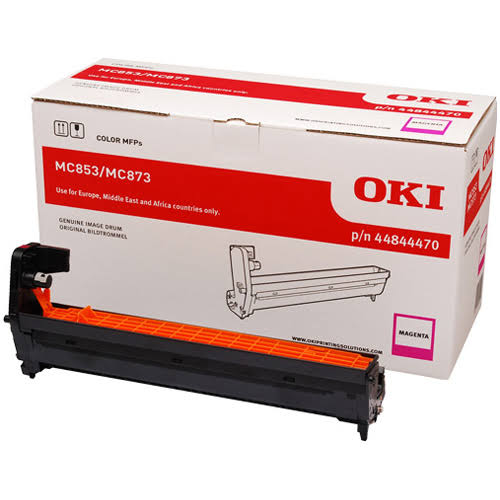
OKI Magenta Image Drum (30,000 Pages) — Genuine OKI 44844470
OKI Magenta Image Drum (30,000 Pages) — Genuine OKI 44844470
Couldn't load pickup availability
New
Genuine OEM part UK supplier GenieCare™ support included
OKI Magenta Image Drum (30,000 Pages) — Genuine OKI 44844470
Restore Consistent Magenta Print Quality on Your OKI MC853/MC873/MC883Genuine OKI 44844470 Magenta image drum — new, sealed, supplied by Printer Genie.
|
 |
Is This the Right Drum Unit?
| Repeating marks or spots at regular intervalsMarks, spots, or streaks that repeat at a fixed distance down the page — usually every few inches — are the classic sign of a worn or damaged drum. The repeat distance matches the drum's circumference. | Drum life warning or end-of-life messageError messages such as "Magenta Drum Near Life" or "Replace Magenta Drum" indicate the drum has reached end of life or has failed. Replacing the drum and resetting the counter will clear these warnings. |
| Ghosting — a faint duplicate image repeating down the pageA faint, lighter version of an earlier image or text reappearing further down the same page or on subsequent pages is a common drum symptom, especially as the drum approaches end of life. | Fading, streaking, or patchiness in one colour onlySince each colour has its own drum, a fault affecting only one colour — while the others print normally — usually points to that specific colour's drum rather than the transfer belt or toner. |
| Proactive maintenance or high page countIf you're approaching 30,000 pages, replacing the drum now avoids print quality issues and unplanned downtime. | Not sure? Ask us firstColour print quality faults can have several causes — drum, transfer belt, toner, or calibration. If you're not certain, contact us before ordering. We can help confirm the right part for your fault. |
Specifications
| Component | Imaging drum unit |
| Primary OEM part number | 44844470 |
| Alternative part numbers | Not applicable — no alternate part number found |
| Condition | New |
| Rated life | 30,000 pages |
| Compatible printers | OKI MC853dn, MC853dnct, MC853dnv, MC873dn, MC873dnc, MC873dnct, MC873dnv, MC873dnx, MC883dn, MC883dnct, MC883dnv |
| Counter reset required | Yes — reset via the printer service/maintenance menu after fitting |
| Calibration after fitting | Recommended — run a colour registration calibration from the printer menu after fitting |
| Weight & delivery | 2kg — courier delivery, tracked |
Compatible Printers
This drum unit fits the following OKI models. If your model is not listed, contact us before ordering — we may be able to confirm compatibility.
| Model | Part Number Confirmed | Notes |
| OKI MC853dn, MC853dnct, MC853dnv | 44844470 | Confirmed compatible |
| OKI MC873dn, MC873dnc, MC873dnct, MC873dnv, MC873dnx | 44844470 | Confirmed compatible |
| OKI MC883dn, MC883dnct, MC883dnv | 44844470 | Confirmed compatible |
What's Included
- 1 × OKI MC853/MC873/MC883 Series drum unit (44844470)
- No additional accessories — drum unit only, as supplied by OKI. Does not include toner — purchased separately.
- 30 days GenieCare™ Expert Support — installation guidance included from date of purchase
- GenieCare™ Expert Support continues when you order toner from us
Installation Notes
Handle the drum unit with care. Do not touch or expose the green drum surface to direct light — even small amounts of skin oil or debris can cause print quality issues. Keep the drum in its packaging (and away from direct light) until you are ready to fit it.
- Power off the printer and disconnect from the mains.
- Open the front or top access panel and remove the toner cartridges if required for access.
- Locate and remove the Magenta drum unit (colour-coded, matches the new drum supplied).
- Unpack the new drum and remove any protective covers/seals before fitting.
- Insert the new drum unit carefully — avoid touching or exposing the drum surface to direct light for extended periods.
- Reinstall toner cartridges and close all panels.
- Power on and run a colour registration calibration from the printer menu.
- Access the printer's service/maintenance menu and reset the drum life counter — reset the drum counter via the service menu if required.
If you need help at any step, contact us via the GenieCare™ Expert Support channel — installation guidance is included with this purchase.
Support
30 days GenieCare™ Expert Support — included free from date of purchase. Our team can help with installation guidance, counter reset instructions, and diagnosis if print quality issues persist after fitting this drum.
GenieCare™ Expert Support continues — order your OKI 4586 series toner from Printer Genie after fitting this drum and support carries on automatically. No subscription. No sign-up.
GenieCare™ Expert Support covers remote diagnosis, guidance, and advice. It is separate from and in addition to any product warranty. Installation support is guidance only — it does not constitute an on-site repair service.
GenieCare™ Expert Support – Included with This Part

Frequently Asked Questions