HP
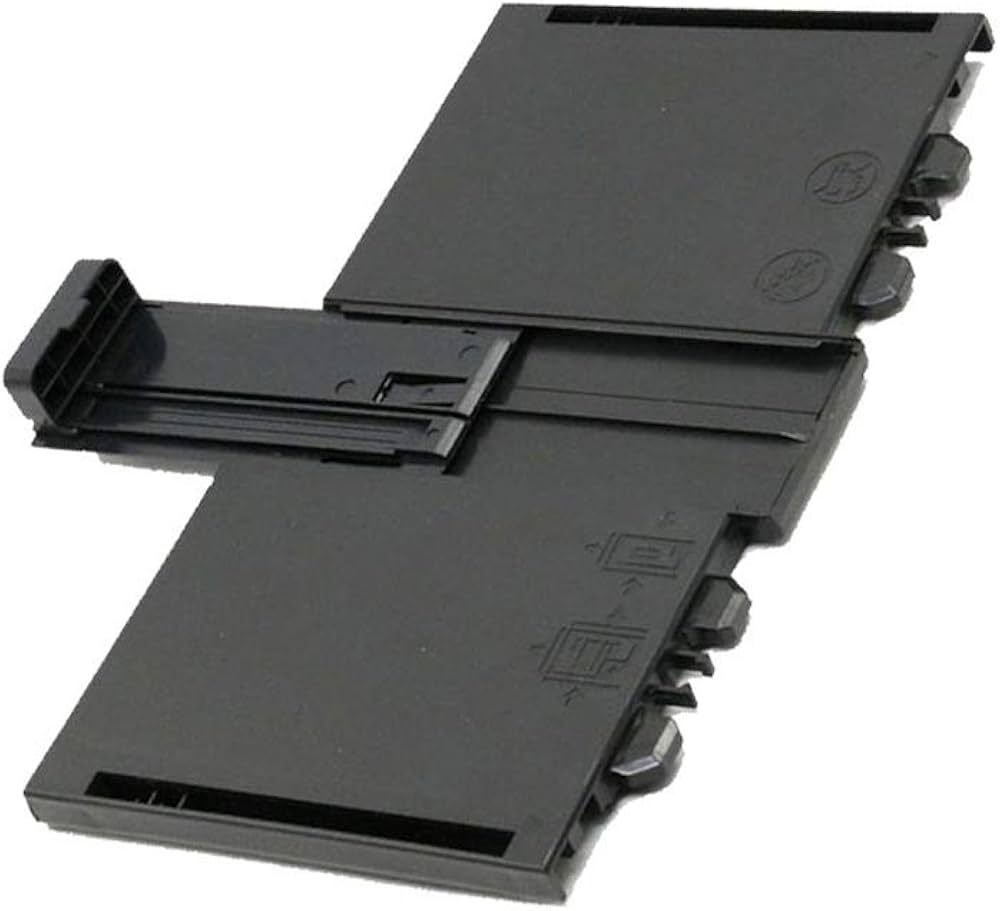
Paper Pick-Up Input Tray Assembly (RM1-9677 / RM1-9677-000CN)
Paper Pick-Up Input Tray Assembly (RM1-9677 / RM1-9677-000CN)
Couldn't load pickup availability
New
HP LaserJet Pro M201 M202 M225 M226 Paper Pick-Up Input Tray (RM1-9677)
Genuine HP Tray 1 replacement for Pro M201
Direct-fit genuine HP paper tray — restores reliable feeding and clears 'tray not recognised' errors.
- Genuine HP Tray 1 — part number RM1-9677
- 250-sheet main input tray — 250-sheet capacity, supports A4, A5, Letter, Legal
- Brand new, unused genuine assembly — a complete, ready-to-fit tray assembly
- Restores normal paper feeding and correct tray recognition
- UK supplier — despatched from our warehouse
- 30 days GenieCare™ Expert Support — installation guidance included
- GenieCare™ Expert Support continues when you order toner from us
When Do You Need a Replacement Tray?
| The tray is cracked, broken, or physically damagedA cracked body, broken paper guides or a snapped lock stops the tray seating and aligning paper correctly. A direct replacement restores full function. | The printer reports the tray missing or not recognisedIf the printer shows "Tray 1 Missing" or similar with the tray fitted, the detection point may be damaged — replacing the assembly usually clears it. |
| Paper feed failures from Tray 1If jams or mis-feeds come specifically from Tray 1 and roller/pad replacement hasn't fixed it, a worn or deformed tray body affecting stack alignment may be the cause. | The tray was lost or damaged in transitTrays are often lost or damaged when printers are moved or bought second-hand without their accessories. This replacement restores a complete printer. |
| Paper guides not holding positionSlipping or broken width/length guides make paper skew and feed unevenly, causing jams and misalignment that only a new tray resolves. | Not sure the tray is the cause? Ask us firstFeed issues from Tray 1 can be the pickup roller or separation pad rather than the tray. Contact us and we can help identify the right part before you order. |
Specifications
| Component | Paper tray 1 assembly — 250-sheet main input tray |
| OEM part number | RM1-9677 |
| Alternative part numbers | RM1-9677-000CN |
| Condition | New — genuine HP component |
| Tray position | Tray 1 — 250-sheet main input tray |
| Sheet capacity | 250 sheets |
| Paper size support | A4, A5, Letter, Legal — adjustable paper guides |
| Compatible printers | HP LaserJet Pro M201, HP LaserJet Pro M202, HP LaserJet Pro M225, HP LaserJet Pro M226 |
| Weight & delivery | Courier delivery, tracked. |
| Warranty | 90-day Printer Genie warranty — covers manufacturing or refurbishment defects under normal use |
Compatible Printers
This tray assembly fits the following HP models. If your model is not listed, contact us before ordering — tray part numbers can vary by region and sub-variant.
| Model | Part Number | Notes |
| HP LaserJet Pro M201 | RM1-9677 | Genuine HP assembly |
| HP LaserJet Pro M202 | RM1-9677 | Genuine HP assembly |
| HP LaserJet Pro M225 | RM1-9677 | Genuine HP assembly |
| HP LaserJet Pro M226 | RM1-9677 | Genuine HP assembly |
What's Included
- 1 × HP paper tray 1 assembly (RM1-9677)
- Paper guides included and set for correct alignment
- 30 days GenieCare™ Expert Support — installation guidance included from date of purchase
- GenieCare™ Expert Support continues when you order toner from us
Fitting Notes
Paper tray replacement is straightforward on most models — no tools required.
- Power off the printer (recommended, not always required for tray replacement).
- Fully extend the existing tray and lift the front edge to release it from the chassis.
- Insert the new tray at the correct angle and slide in firmly until it seats and clicks.
- Set the paper guides to the correct paper size.
- Load paper, power on and run a test print from Tray 1 to confirm recognition and feed.
If the printer still does not recognise the tray after fitting, contact us — the issue may be the tray sensor rather than the tray itself.
Warranty & Support
90-day Printer Genie warranty — covers manufacturing or refurbishment defects under normal use. Full terms in our Terms & Conditions.
30 days GenieCare™ Expert Support included free — installation guidance by email. Order toner from Printer Genie and support continues automatically — no subscription, no sign-up. GenieCare™ Expert Support is separate from and in addition to the warranty.
Frequently Asked Questions
My printer still shows "Tray Missing" after fitting — what do I do?
If the printer still reports the tray missing after fitting, the cause is likely the tray detection sensor inside the printer rather than the tray. Contact us and we can help diagnose whether it's a sensor fault or a seating issue.
Is this a genuine HP tray or a compatible replacement?
This is a genuine HP paper tray — an original component from the same manufacturer as the printer, supplied brand new and unused.
What toner does this printer use?
This tray fits several HP models that use different cartridges — order the correct toner for your exact model from Printer Genie, and GenieCare™ Expert Support stays active with each order.
Share