Printer Genie Ltd
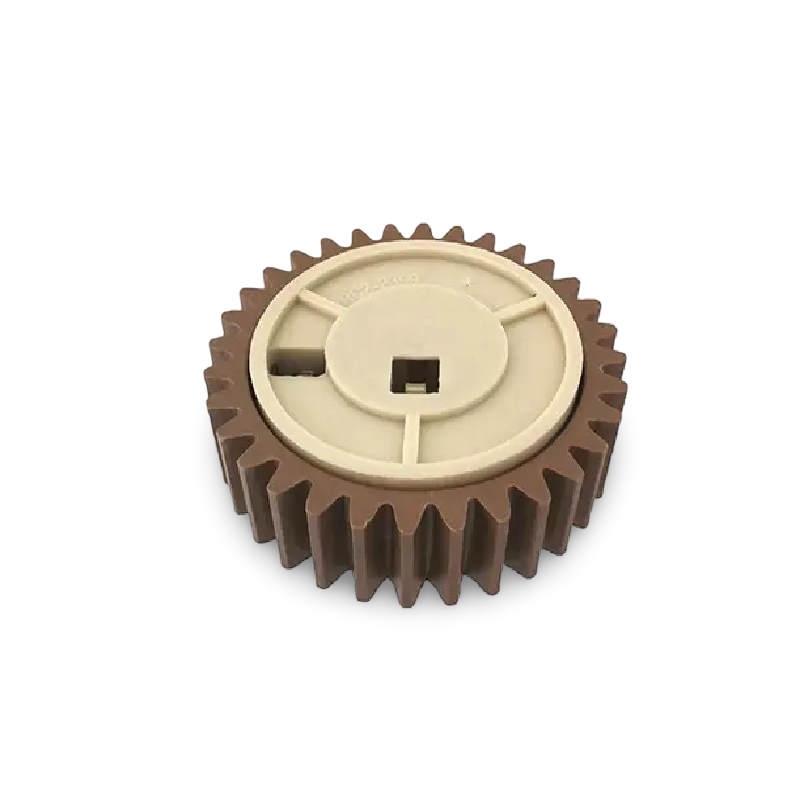
HP RC2-2399 Fuser Pressure Roller Gear 32T — LaserJet P4014 P4015 P4515 M4555
HP RC2-2399 Fuser Pressure Roller Gear 32T — LaserJet P4014 P4015 P4515 M4555
Couldn't load pickup availability
New — Compatible
HP Fuser Pressure Roller Gear (32T) — RC2-2399 — LaserJet P4014 and more
Fuser Pressure Roller Gear (32T) for HP LaserJet P4014, P4014n, P4014dn, P4015n, P4015tn, P4015x, P4015dn, P4515n, P4515tn, P4515x, P4515xm, M4555 MFP
Part number RC2-2399 — replacement fuser pressure roller gear (32t) for HP LaserJet P4014 and compatible series.
- Direct-fit fuser pressure roller gear (32t) for HP LaserJet P4014 and compatible series
- Part number: RC2-2399 (alt: RC2-2399-000)
- New compatible — produced to OEM specification
- 90-day warranty against manufacturing defects
- UK supplier — despatched from our warehouse
Is This the Right Part?
| Grinding or clicking noise from the fuser areaA grinding or clicking noise during printing — particularly from the rear of the printer where the fuser sits — is the most common symptom of a worn or stripped fuser gear. The noise typically occurs on every page and may worsen over time. | Fuser drive failure without an electrical fault codeIf the fuser is not rotating but there is no 50.x or electrical fault code present, a stripped or broken gear is the likely cause. The fuser motor is running but drive is not being transmitted to the fuser rollers. |
| Print quality unaffected but noise presentIn early-stage gear wear, print quality may still be acceptable while a grinding noise is present. Replacing the gear before the tooth fails completely avoids a more serious fuser drive failure. | 50.x error code present?A 50.x error code indicates an electrical or thermal fuser fault — not a mechanical gear issue. A gear replacement will not resolve a 50.x error. If a 50.x error is showing, the fuser unit itself requires replacement. Contact us and we can advise. |
Specifications
| Component | Fuser Pressure Roller Gear (32T) — fuser drive assembly |
| Primary OEM part number | RC2-2399 |
| Alternative part numbers | RC2-2399-000 |
| Condition | New compatible — produced to OEM specification |
| Fitment | Inside the fuser assembly — fuser drive gear train |
| Typical installation time | 15–30 minutes (after fuser removal) |
| Compatible printers | LaserJet P4014, P4014n, P4014dn, P4015n, P4015tn, P4015x, P4015dn, P4515n, P4515tn, P4515x, P4515xm, M4555 MFP |
| Warranty | 90 days against manufacturing defects |
| Weight & delivery | Shipping weight approx. 70 g — courier delivery, tracked |
Compatible Printers
This fuser pressure roller gear (32t) fits the following HP models. Contact us before ordering if your model is not listed.
| Model | Part Number Confirmed | Notes |
| HP LaserJet P4014 | RC2-2399 | — |
| HP LaserJet P4014n | RC2-2399 | — |
| HP LaserJet P4014dn | RC2-2399 | — |
| HP LaserJet P4015n | RC2-2399 | — |
| HP LaserJet P4015tn | RC2-2399 | — |
| HP LaserJet P4015x | RC2-2399 | — |
| HP LaserJet P4015dn | RC2-2399 | — |
| HP LaserJet P4515n | RC2-2399 | — |
| HP LaserJet P4515tn | RC2-2399 | — |
| HP LaserJet P4515x | RC2-2399 | — |
| HP LaserJet P4515xm | RC2-2399 | — |
| HP LaserJet M4555 MFP | RC2-2399 | — |
What's Included
- 1 × Fuser Pressure Roller Gear (32T) (RC2-2399)
Install Notes
Allow the fuser to cool fully before disassembly — at least 30 minutes after powering off.
- Power off the printer and disconnect from the mains. Allow to cool fully — minimum 30 minutes.
- Remove the fuser unit from the printer via the rear access panel. Release the locking levers and slide out.
- Open the fuser housing to access the drive gear train.
- Identify and remove the worn gear. Note the orientation and position before removal.
- Fit the new gear in the same position. Check tooth mesh and clearances are correct before reassembling.
- Reassemble the fuser housing and reinstall in the printer.
- Run 5–10 test prints and listen for any remaining noise.
If grinding noise persists after fitting, contact us — further diagnosis of the fuser drive train may be required.
Will a gear replacement fix a 50.x fuser error?
No. A 50.x error code is an electrical or thermal fault — a gear will not resolve it. If a 50.x error is present, the fuser unit itself requires replacement. This gear is for mechanical faults only — grinding noise, clicking, or drive failure without an error code.
Do you stock fuser units for these models?
Yes — we stock complete fuser units, maintenance kits, and other spare parts for these models. Search the model number on our store or contact us and we will point you to the right part.
Share