1
/
of
1
HP
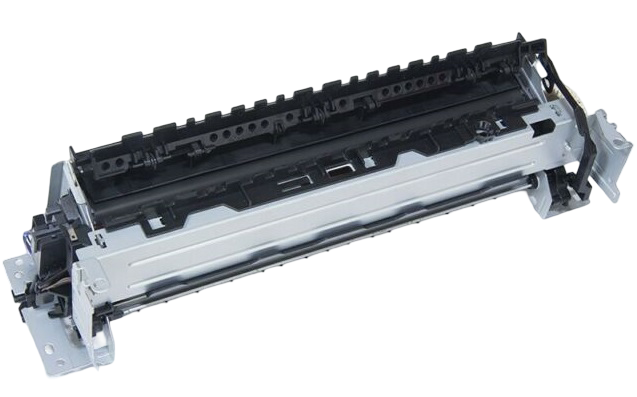
HP RM2-2555 Genuine 220V Fuser Unit for LaserJet M402 M403 M404 M426 M427 M428
HP RM2-2555 Genuine 220V Fuser Unit for LaserJet M402 M403 M404 M426 M427 M428
Regular price
£95.00 GBP
Regular price
Sale price
£95.00 GBP
Unit price
/
per
Shipping calculated at checkout.
Condition: New
Couldn't load pickup availability
HP RM2-2555 Genuine Original 220V Fuser Unit
Condition: New Original HP
Restore print quality and eliminate fuser-related errors with this genuine HP RM2-2555 220V fuser unit. This is an original HP replacement assembly designed for selected HP LaserJet Pro printers. It resolves common faults such as toner rubbing off the page, ghosting, wrinkled paper and “Replace Fuser” messages.
Highlights
- Genuine Original HP fuser unit
- HP Part Number: RM2-2555
- 220–240V UK/EU version
- Direct-fit replacement assembly
- Installation support available from Printer Genie
- 3-month warranty
Specifications
| Component | Fuser Unit |
|---|---|
| OEM Part Number | RM2-2555 |
| Voltage | 220–240V |
| Condition | New Original HP |
| Printer Technology | Mono Laser |
What’s Included
- 1 × Genuine HP RM2-2555 Fuser Unit
Compatibility
View Compatible Models
- HP LaserJet Pro M402dn
- HP LaserJet Pro M402dne
- HP LaserJet Pro M402dw
- HP LaserJet Pro M402n
- HP LaserJet Pro M403d
- HP LaserJet Pro M403dn
- HP LaserJet Pro M403dw
- HP LaserJet Pro M403n
- HP LaserJet Pro M404dn
- HP LaserJet Pro M404dw
- HP LaserJet Pro M405dn
- HP LaserJet Pro M405dw
- HP LaserJet Pro MFP M426dn
- HP LaserJet Pro MFP M426fdn
- HP LaserJet Pro MFP M426fdw
- HP LaserJet Pro M427dw
- HP LaserJet Pro M427fdn
- HP LaserJet Pro M427fdw
- HP LaserJet Pro MFP M428dw
- HP LaserJet Pro MFP M428fdn
- HP LaserJet Pro MFP M428fdw
- HP LaserJet Pro M304a
- HP LaserJet Pro M304dn
- HP LaserJet Pro M305d
- HP LaserJet Pro M305dn
- HP LaserJet Pro M329dn
- HP LaserJet Pro M329dw
If your exact model is not listed, contact us and we will confirm compatibility before purchase.
Common Problems This Fuser Can Fix
- Toner rubbing off the page
- Ghosting or repeated images
- Wrinkled paper
- Fuser life warning
- Replace Fuser message
- 50.x fuser errors
Install Notes
- Power off and unplug the printer.
- Allow the printer to cool fully.
- Remove the rear cover and release the fuser locks.
- Install the replacement fuser.
- Run test prints to verify correct operation.
Share