Printer Genie Ltd
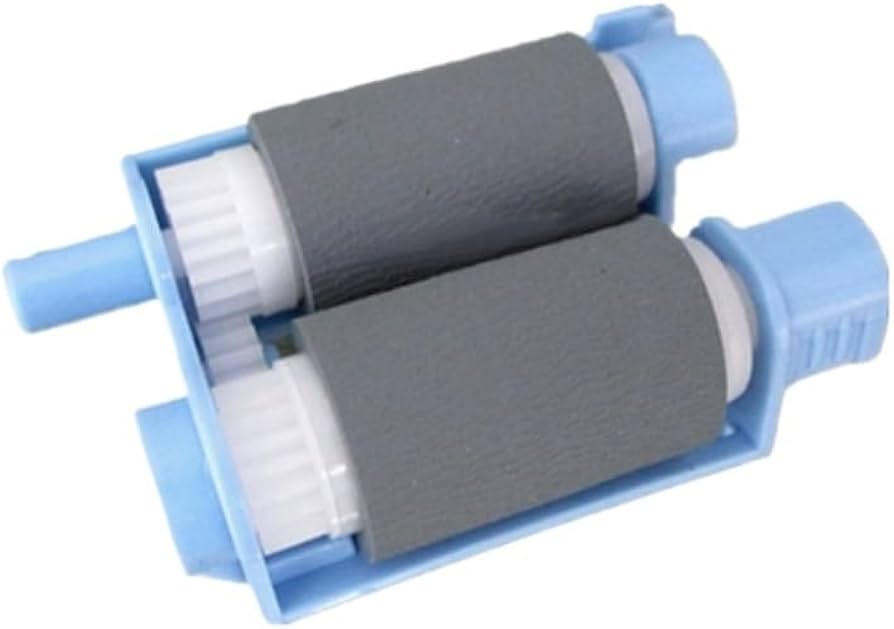
HP Tray 2 Pickup Roller — RM2-5452 — LaserJet Pro M402 M428 and more
HP Tray 2 Pickup Roller — RM2-5452 — LaserJet Pro M402 M428 and more
Couldn't load pickup availability
New — Compatible
HP Tray 2 Pickup Roller — RM2-5452 — LaserJet Pro M402 and more
Tray 2 Pickup Roller for Tray 2 — HP LaserJet Pro M402, M403, M404, M405, M426, M427, M428, M429, M304, M305, M329
Part number RM2-5452 — restores reliable paper feed from Tray 2.
- Direct-fit tray 2 pickup roller for Tray 2 on HP LaserJet Pro M402 and compatible series
- Part number: RM2-5452 (alt: 3PZ15-67965)
- New compatible — produced to OEM specification for feed torque and surface quality
- 12-month warranty against manufacturing defects
- UK supplier — despatched from our warehouse
Is This the Right Part?
| Paper not feeding from Tray 2If the printer sounds like it is trying to pick up paper from Tray 2 but the page fails to enter the feed path — or a jam is reported immediately — the pickup roller is the first component to check. Worn rubber loses the grip needed to pull paper from the stack. | Multiple sheets feeding at onceIf two or more sheets are being pulled through simultaneously from Tray 2, the separation pad or separation roller is the likely cause. When worn it can no longer hold back the second sheet and multi-feed occurs. |
| Recurring jams at tray entryIf jams are happening repeatedly at the same point at the Tray 2 entry, worn rollers or a glazed separation pad are almost always the cause. Replacing the roller and pad together typically resolves this permanently. | Paper slipping or skewing on entryIf paper enters the printer at an angle or slips before reaching the registration rollers, worn roller surfaces are usually the cause. New rollers restore the correct feed torque and alignment. |
| Fault from a different tray?This part is for Tray 2 only. If the fault is occurring from a different tray, a different part number applies. Contact us before ordering and we will confirm the correct part. | Printer not attempting to pick up at all?If the printer makes no mechanical attempt — no sound of rollers engaging — the pickup solenoid or clutch is the more likely cause. Contact us and we can help diagnose before you order. |
Specifications
| Component | Tray 2 Pickup Roller for Tray 2 |
| Primary OEM part number | RM2-5452 |
| Alternative part numbers | 3PZ15-67965 |
| Condition | New compatible — produced to OEM specification for feed torque and surface quality |
| Target location | Tray 2 |
| Compatible printers | LaserJet Pro M402, M403, M404, M405, M426, M427, M428, M429, M304, M305, M329 |
| Warranty | 12 months against manufacturing defects — normal wear from use is not covered |
| Weight & delivery | [WEIGHT_DELIVERY] |
Compatible Printers
This part fits Tray 2 on the following HP models. This listing is specifically for Tray 2 — other trays on the same printer use different part numbers. Contact us before ordering if your model is not listed or if you are unsure which tray the fault is from.
| Model | Tray | Part Number | Notes |
| HP LaserJet Pro M402n, M402d, M402dn, M402dw | Tray 2 | RM2-5452 | — |
| HP LaserJet Pro M403n, M403d, M403dn, M403dw | Tray 2 | RM2-5452 | — |
| HP LaserJet Pro M404n, M404d, M404dn, M404dw | Tray 2 | RM2-5452 | — |
| HP LaserJet Pro M405n, M405dn, M405dw | Tray 2 | RM2-5452 | — |
| HP LaserJet Pro MFP M426fdn, M426fdw | Tray 2 | RM2-5452 | — |
| HP LaserJet Pro MFP M427fdn, M427fdw, M427dw | Tray 2 | RM2-5452 | — |
| HP LaserJet Pro MFP M428fdn, M428fdw | Tray 2 | RM2-5452 | — |
| HP LaserJet Pro MFP M429fdn, M429fdw | Tray 2 | RM2-5452 | — |
| HP LaserJet Pro M304a | Tray 2 | RM2-5452 | — |
| HP LaserJet Pro M305d | Tray 2 | RM2-5452 | — |
| HP LaserJet Pro M329dn | Tray 2 | RM2-5452 | — |
What's Included
- 1 × Tray 2 Pickup Roller for Tray 2 — HP LaserJet Pro M402 series (RM2-5452)
Frequently Asked Questions
Is this a genuine HP part or compatible?
This is a new compatible part produced to OEM specification for feed torque and surface quality. It carries a 12-month warranty against manufacturing defects. If you require a genuine HP part, contact us and we can advise on availability.
The feed fault is still happening after fitting — what next?
The most common causes are: the fault is from a different tray (different part number), the pickup solenoid or clutch is faulty rather than the roller, or feed surfaces need cleaning. Contact us and we can help diagnose the next step.
Do you stock other parts for these printers?
Yes — we stock fusers, maintenance kits, toner, and other spare parts for the HP models listed. Search the model number on our store or contact us and we will point you to the right part.
Share